基于图的代理工作流程(Graph-based agent workflows)
在 ADK 中,基于图的代理工作流(graph-based agent workflows)使您能够构建具有更精确控制能力的代理程序;这些代理程序能够执行既包含代码逻辑,又具备人工智能推理功能的确定性流程。基于图的工作流允许您将代理的逻辑结构定义为由执行节点(execution nodes)和连接这些节点的边(edges)组成的图(graph),从而将基于人工智能的代理推理能力与传统的确定性工具及代码相结合。
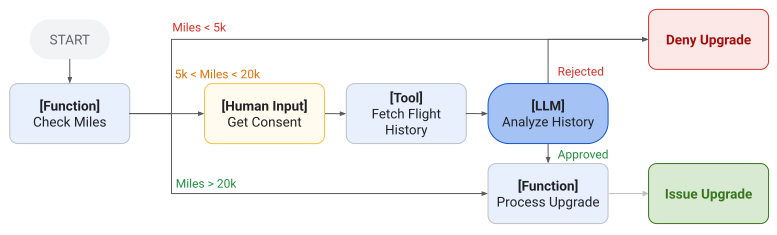
图 1. 这是一种基于图模型的代理设计方法,用于实现航班升级功能。该设计结合了不同类型的工作流程节点(包括函数、人工输入、工具以及大型语言模型(LLM)的功能)。
Kotlin 中的实验性功能(Experimental features)
在 ADK Kotlin 中,基于图的代理工作流功能仍处于实验阶段。该功能可能存在一些限制,其表现也可能发生变化。
预构建的 ADK(Application Development Kit) 模板工作流程(Template Workflows)例如: 顺序执行代理(Sequential Agents)仅在一组代理(agents)之间提供明确的流程控制机制。您可以继续构建那些包含较长提示信息(long prompts)的标准 ADK 代理,并将这些代理用于基于图(graph-based)的工作流代理(workflow agents)中。当需要更精确的控制时,基于图的工作流代理能够让您更灵活地安排任务的路由和执行方式。基于图的工作流具有以下优势:
- 定义精确的逻辑: 明确地规划路由逻辑,以管理不同节点之间的转换(即数据或请求的传输过程)。
- 实现复杂的结构: 构建代理工作流程,以支持分支操作和状态管理功能。
- 在没有人工智能(AI)的情况下,运行一系列函数(function chains)。 无需调用任何生成式 AI 模型,即可使用代理工具以及您自己编写的代码。
- 提高可靠性: 通过依赖结构化的节点定义(而不仅仅是提示信息),来提高代理程序的可预测性。
ADK 中的工作流样式(Workflow Styles in ADK)
ADK 提供了三种互补的方法来完成多步骤的工作:
- 基于图的工作流程(Graph-based workflows) (本节):一个由节点和边组成的声明性图结构,其中边的路由方式是明确的;这种结构最适合用于那些具有确定性、且结构化程度较高的流程。
- 动态工作流程(Dynamic Workflows): **程序化编排(Programmatic Orchestration)** 可以通过您自己的代码(循环、条件语句、递归等)来实现。当控制流程过于复杂,或者需要通过迭代方式来处理数据时,这种编程方式最为适用;因为静态数据结构(如静态图)无法有效地表示这种复杂的控制逻辑。
- 预先构建的工作流代理(Prebuilt workflow agents) (顺序执行、并行执行、循环执行):这些是用于构建常见程序模式的高级构建块,无需用户自己手动构建数据结构(如图)。
立即开始使用吧!
本节介绍了如何开始使用基于图的代理(graph-based agents)。以下示例展示了如何创建一个基于图的代理工作流程:该流程首先生成一个城市名称,然后通过一个代码函数查询该城市的当前时间,最后代理会报告这些信息。
from google.adk import Agent
from google.adk import Workflow
from google.adk import Event
from pydantic import BaseModel

city_generator_agent = Agent(
    name="city_generator_agent",
    model="gemini-flash-latest",
    instruction="""Return the name of a random city.
      Return only the name, nothing else.""",
)

class CityTime(BaseModel):
    time_info: str  # time information
    city: str       # city name

def lookup_time_function(node_input: str):
    """Simulate returning the current time in the specified city."""
    return CityTime(time_info="10:10 AM", city=node_input)

city_report_agent = Agent(
    name="city_report_agent",
    model="gemini-flash-latest",
    input_schema=CityTime,
    instruction="""You receive a CityTime with time_info and city fields.
    Output a single line stating that it is that time in that city right
    now.""",
)

def completed_message_function(node_input: str):
    return Event(
        message=f"{node_input}\n WORKFLOW COMPLETED.",
    )

root_agent = Workflow(
    name="root_agent",
    edges=[
        ("START", city_generator_agent, lookup_time_function,
          city_report_agent, completed_message_function)
    ],
)
在 ADK TypeScript 中, Workflow “takes an” 表示“需要一个”或“需要输入某个值”。 edges 数组中的每一行都列出了需要按顺序执行的节点。 node() 这个函数用于“包装”另一个函数、代理(agent)、工具(tool)或其他类似的对象。 Workflow 作为一个图节点(graph node),需要设置该节点的名称(name)及其相关属性(properties)。 inputSchema 和 outputSchema `contracts.Schemas`
可以是 Zod 对象,也可以是 Genai 对象。 Schema每个节点的返回值都会作为输入传递给下一个节点,因此你无需修改会话状态(session state)。
import {
  createEvent,
  LlmAgent,
  node,
  NodeContext,
  Workflow,
} from '@google/adk';
import { z } from 'zod';

const cityGeneratorAgent = new LlmAgent({
  name: 'city_generator_agent',
  model: 'gemini-flash-latest',
  instruction: `Return the name of a random city.
      Return only the name, nothing else.`,
});

/** The structured payload handed from the lookup node to the report agent. */
const cityTimeSchema = z.object({
  timeInfo: z.string().describe('Time information.'),
  city: z.string().describe('City name.'),
});
type CityTime = z.infer<typeof cityTimeSchema>;

/** Simulates returning the current time in the specified city. */
function lookupTimeFunction(_ctx: NodeContext, nodeInput: string): CityTime {
  return { timeInfo: '10:10 AM', city: nodeInput.trim() };
}

const cityReportAgent = new LlmAgent({
  name: 'city_report_agent',
  model: 'gemini-flash-latest',
  instruction: `Output the following line:
    It is {CityTime.timeInfo} in {CityTime.city} right now.`,
});

function completedMessageFunction(_ctx: NodeContext, nodeInput: string) {
  return createEvent({
    content: {
      role: 'model',
      parts: [{ text: `${nodeInput}\n WORKFLOW COMPLETED.` }],
    },
  });
}

export const rootAgent = new Workflow({
  name: 'root_agent',
  edges: [
    [
      'START',
      cityGeneratorAgent,
      node(lookupTimeFunction, {
        name: 'lookup_time_function',
        outputSchema: cityTimeSchema,
      }),
      node(cityReportAgent, { inputSchema: cityTimeSchema }),
      node(completedMessageFunction, { name: 'completed_message_function' }),
    ],
  ],
});
在 ADK Go 中,顺序式工作流程会使用图引擎(graph engine)来处理数据流。
workflow.NewFunctionNode 将每个步骤都包裹起来(即对每个步骤进行处理或执行相应的操作),并且…… workflow.Chain 将这些节点按顺序连接起来(即形成一个连续的序列)。 edges `slice`:该框架会自动将每个节点的返回值(其类型已被确定)传递给下一个节点。
event.Output — 不需要写入任何会话状态数据。整个图结构被封装在(某个容器或框架中)。 workflowagent.New该过程会生成一个标准结果(即符合某种规范或要求的输出)。 agent.Agent.
// cityTime holds the data passed from the lookup step to the report step.
type cityTime struct {
    City     string
    TimeInfo string
}

// newSequentialGetStarted builds a three-node sequential workflow using the
// v2 graph engine. Each node is a workflow.NewFunctionNode whose return value
// is automatically wrapped in session.Event.Output and forwarded to the next
// node as its typed input.
//
// This is the Go equivalent of the Python Workflow example:
//
//  root_agent = Workflow(
//      name="root_agent",
//      edges=[("START", city_generator_agent, lookup_time_function,
//               city_report_agent, completed_message_function)],
//  )
func newSequentialGetStarted() (agent.Agent, error) {
    // Step 1: return a city name. The string is set as event.Output and
    // becomes the typed input of the next node.
    cityGeneratorNode := workflow.NewFunctionNode("city_generator_agent",
        func(_ agent.Context, _ any) (string, error) {
            return "Tokyo", nil
        },
        workflow.NodeConfig{},
    )

    // Step 2: receive the city name and return structured time data.
    lookupTimeNode := workflow.NewFunctionNode("lookup_time_function",
        func(_ agent.Context, city string) (cityTime, error) {
            return cityTime{City: city, TimeInfo: "10:10 AM"}, nil
        },
        workflow.NodeConfig{},
    )

    // Step 3: receive the cityTime struct and produce the final report string.
    cityReportNode := workflow.NewFunctionNode("city_report_agent",
        func(_ agent.Context, ct cityTime) (string, error) {
            return fmt.Sprintf("It is %s in %s right now.\nWORKFLOW COMPLETED.",
                ct.TimeInfo, ct.City), nil
        },
        workflow.NodeConfig{},
    )

    // workflow.Chain wires START → cityGeneratorNode → lookupTimeNode → cityReportNode.
    // Data flows through event.Output: no session state writes needed.
    return workflowagent.New(workflowagent.Config{
        Name:        "root_agent",
        Description: "Sequential workflow: generate city → look up time → report.",
        Edges:       workflow.Chain(workflow.Start, cityGeneratorNode, lookupTimeNode, cityReportNode),
    })
}
在 ADK Kotlin 中, workflow 这个函数用于构建某个对象或结构。 Workflow “从边缘开始……”它的代码块是这样声明的…… chain 连接(设备或系统) Start 并且按顺序处理每个节点。 LlmAgent 它是一个节点(node),并且…… node 该系统将一个函数封装成一个节点,该节点具有明确指定的输入类型和输出类型。每个节点的输出会被作为下一个节点的输入传递给它;而“代理节点”(agent node)则会将其接收到的输入视为用户的消息。
@file:OptIn(ExperimentalWorkflowApi::class)

package com.google.adk.kt.examples.graphs.getstarted

import com.google.adk.kt.agents.Instruction
import com.google.adk.kt.agents.LlmAgent
import com.google.adk.kt.annotations.ExperimentalWorkflowApi
import com.google.adk.kt.models.Gemini
import com.google.adk.kt.types.Content
import com.google.adk.kt.types.Role
import com.google.adk.kt.types.Schema
import com.google.adk.kt.types.Type
import com.google.adk.kt.workflow.Start
import com.google.adk.kt.workflow.emit
import com.google.adk.kt.workflow.node
import com.google.adk.kt.workflow.workflow

val cityGeneratorAgent =
    LlmAgent(
        name = "city_generator_agent",
        model = Gemini(name = "gemini-flash-latest"),
        instruction =
            Instruction(
                """
                Return the name of a random city.
                Return only the name, nothing else.
                """.trimIndent(),
            ),
    )

// The structured payload handed from the lookup node to the report agent.
val cityTimeSchema =
    Schema(
        type = Type.OBJECT,
        properties =
            mapOf(
                "time_info" to Schema(type = Type.STRING, description = "Time information."),
                "city" to Schema(type = Type.STRING, description = "City name."),
            ),
        required = listOf("time_info", "city"),
    )

// Simulate returning the current time in the specified city.
val lookupTimeFunction =
    node<String, Map<String, String>>(
        name = "lookup_time_function",
        outputSchema = cityTimeSchema,
    ) { _, nodeInput ->
        mapOf("time_info" to "10:10 AM", "city" to nodeInput.trim())
    }

// The lookup result arrives as this agent's input, as JSON text.
val cityReportAgent =
    LlmAgent(
        name = "city_report_agent",
        model = Gemini(name = "gemini-flash-latest"),
        inputSchema = cityTimeSchema,
        instruction =
            Instruction(
                """
                Output the following line, using the time_info and city from the input:
                It is <time_info> in <city> right now.
                """.trimIndent(),
            ),
    )

val completedMessageFunction =
    node<String, Unit>("completed_message_function") { _, nodeInput ->
        emit(Content.fromText(Role.MODEL, "$nodeInput\n WORKFLOW COMPLETED."))
    }

val rootAgent =
    workflow("root_agent") {
        chain(
            Start,
            cityGeneratorAgent,
            lookupTimeFunction,
            cityReportAgent,
            completedMessageFunction,
        )
    }
这段示例代码展示了如何构建一个简单、顺序化的工作流程,并在代理处理与代码执行之间进行切换。虽然你也可以通过使用单个代理(该代理具有较长的提示信息)以及工具调用来完成这些步骤,但基于图形化的方法能够让你更精确地控制任务的执行顺序以及每个步骤产生的数据输出。
有关基于图形的工作流程中的数据处理的更多信息,请参阅…… 使用工作流节点和代理进行数据处理.
使用图表来构建开发流程(Build processes with graphs)
您可以使用基于提示的代理(prompt-based agents)来定义包含多个步骤的流程,并通过 ADK 代理的 “instructions” 字段为这些步骤和操作提供详细的说明。然而,随着这些说明和操作变得越来越复杂,确保代理能够正确执行每一个步骤和指导原则就会变得更加困难,同时也降低了系统的可靠性。
基于图的工作流代理相比基于提示的代理具有显著优势,因为它们允许你通过代码来明确地定义整个工作流程。在使用基于图的工作流代理时,流程的每个步骤都可以被定义为具体的执行操作。 Node 在图中,每个节点都可以代表一个 AI 代理、一个工具,或者你编写的代码。下图展示了如何将一个简单的、基于提示的代理(prompt-based agent)转换为一个工作流代理图(workflow agent graph):
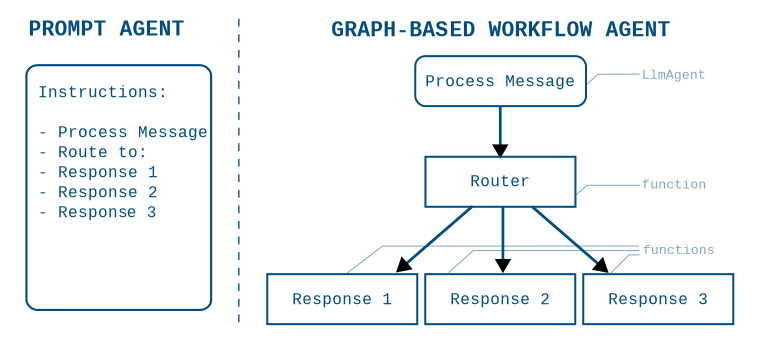
图 2. 基于提示的代理指令的结构被转换成了基于图形的工作流程。
从基于提示的代理(prompt-based agents)转向基于图形的流程代理(graph-based workflow agents),可以让您更明确地分解程序中的各个任务,从而定义出具体的执行流程。一旦这些执行流程被定义好,代理应用程序就会按照图中的步骤来执行相应的操作,并根据需要在这类由人工智能驱动的代理(non-deterministic AI-powered agents)与确定性代码(deterministic code)之间进行切换。
以下代码示例展示了如何将图 2 中的工作流程图转换为基于图的代理(graph-based agent):
process_message = Agent(
    name="process_message",
    model="gemini-flash-latest",
    instruction="""Classify user message into either "BUG", "CUSTOMER_SUPPORT",
      or "LOGISTICS". If you think a message applies to more than one category,
      reply with a comma separated list of categories.
   """,
)

def router(node_input: str):
    routes = node_input.split(",")
    routes = [route.strip() for route in routes]
    return Event(route=routes)

def response_1_bug():
    return Event(message="Handling bug...")

def response_2_support():
    return Event(message="Handling customer support...")

def response_3_logistics():
    return Event(message="Handling logistics...")

root_agent = Workflow(
   name="routing_workflow",
   edges=[
       ("START", process_message, router),
       ( router,
           {
               "BUG": response_1_bug,
               "CUSTOMER_SUPPORT": response_2_support,
               "LOGISTICS": response_3_logistics,
           }
       )
   ],
)
在 ADK TypeScript 中,路由器节点会返回一个事件(event),该事件包含一些数据。
route 该值是通过特定方式创建的(即:`value, created with...`)。 createEvent({route})第二行边缘节点将每个路由值映射到负责处理该值的节点。 route 该代码将数据分配给一个数组(array),并同时调用所有匹配的(matching)处理函数(branch dispatches);这样一来,示例中的分类器(classifier)就能够返回多个分类结果(return more than one category)。 DEFAULT_ROUTE `setting` 会捕获那些没有被任何代码分支匹配到的值。
import {
  createEvent,
  DEFAULT_ROUTE,
  LlmAgent,
  node,
  NodeContext,
  Workflow,
} from '@google/adk';

/** The routes this graph has edges for. */
const ROUTES = ['BUG', 'CUSTOMER_SUPPORT', 'LOGISTICS'] as const;

const processMessage = new LlmAgent({
  name: 'process_message',
  model: 'gemini-flash-latest',
  instruction: `Classify user message into either "BUG", "CUSTOMER_SUPPORT",
      or "LOGISTICS". If you think a message applies to more than one category,
      reply with a comma separated list of categories.
      Reply with the categories only, nothing else.`,
});

const router = node(
  (_ctx: NodeContext, nodeInput: string) => {
    const text = String(nodeInput).toUpperCase();
    const matched = ROUTES.filter((route) =>
      new RegExp(`\\b${route}\\b`).test(text),
    );
    return createEvent({ route: matched.length > 0 ? matched : DEFAULT_ROUTE });
  },
  { name: 'router' },
);

/** Emits a user-facing message: `content`, with no `output`. */
const message = (text: string) =>
  createEvent({ content: { role: 'model', parts: [{ text }] } });

const response1Bug = node(() => message('Handling bug...'), {
  name: 'response_1_bug',
});
const response2Support = node(() => message('Handling customer support...'), {
  name: 'response_2_support',
});
const response3Logistics = node(() => message('Handling logistics...'), {
  name: 'response_3_logistics',
});
const responseUnknown = node(
  (_ctx: NodeContext, nodeInput: string) =>
    message(`Could not classify that (classifier said: ${nodeInput}).`),
  { name: 'response_unknown' },
);

export const rootAgent = new Workflow({
  name: 'routing_workflow',
  edges: [
    ['START', processMessage, router],
    [
      router,
      {
        BUG: response1Bug,
        CUSTOMER_SUPPORT: response2Support,
        LOGISTICS: response3Logistics,
        [DEFAULT_ROUTE]: responseUnknown,
      },
    ],
  ],
});
在 ADK Go 中,条件路由功能是通过以下方式实现的: workflow.NewEmittingFunctionNode
用于设置 event.Routes 和 workflow.StringRoute 需要发送到匹配处理器的数据(edges)——这相当于 Python 中的相应功能。 router `function and dict dispatch.` workflow.Concat 将链(chain)和条件边(conditional edges)合并为一个整体。 edges 传递给函数的 `slice` 对象 workflowagent.New.
// classifyMessage is the router node. It emits ev.Routes to select which
// branch to follow — the Go equivalent of Python's:
//
//  def router(node_input: str):
//      return Event(route=["BUG"])
func classifyMessage(ctx agent.Context, msg string, emit func(*session.Event) error) (any, error) {
    // In a real workflow this step calls an LLM; here we classify by keyword.
    category := "LOGISTICS"
    lower := strings.ToLower(msg)
    switch {
    case strings.Contains(lower, "bug") || strings.Contains(lower, "error"):
        category = "BUG"
    case strings.Contains(lower, "help") || strings.Contains(lower, "support"):
        category = "CUSTOMER_SUPPORT"
    }

    ev := session.NewEvent(ctx, ctx.InvocationID())
    ev.Routes = []string{category} // drives edge dispatch
    ev.Output = msg                // forward original message to the chosen handler
    if err := emit(ev); err != nil {
        return nil, err
    }
    return nil, nil // nil suppresses the automatic terminal event
}

// newProcessPipeline builds a classification + conditional-routing workflow
// using the v2 graph engine. The classifyMessage emitting node sets
// ev.Routes, and the graph engine dispatches to the matching handler via
// workflow.StringRoute.
//
// This is the Go equivalent of the Python Workflow example:
//
//  root_agent = Workflow(
//      name="routing_workflow",
//      edges=[
//          ("START", process_message, router),
//          (router, {
//              "BUG": response_1_bug,
//              "CUSTOMER_SUPPORT": response_2_support,
//              "LOGISTICS": response_3_logistics,
//          }),
//      ],
//  )
func newProcessPipeline() (agent.Agent, error) {
    classifyNode := workflow.NewEmittingFunctionNode(
        "process_message", classifyMessage, workflow.NodeConfig{},
    )

    bugNode := workflow.NewFunctionNode("response_1_bug",
        func(_ agent.Context, _ any) (string, error) {
            return "Handling bug...", nil
        },
        workflow.NodeConfig{},
    )

    supportNode := workflow.NewFunctionNode("response_2_support",
        func(_ agent.Context, _ any) (string, error) {
            return "Handling customer support...", nil
        },
        workflow.NodeConfig{},
    )

    logisticsNode := workflow.NewFunctionNode("response_3_logistics",
        func(_ agent.Context, _ any) (string, error) {
            return "Handling logistics...", nil
        },
        workflow.NodeConfig{},
    )

    // workflow.Concat merges the sequential chain with the conditional edges.
    // Each workflow.Edge carries a workflow.StringRoute matcher that the engine
    // checks against ev.Routes emitted by classifyNode.
    edges := workflow.Concat(
        workflow.Chain(workflow.Start, classifyNode),
        []workflow.Edge{
            {From: classifyNode, To: bugNode, Route: workflow.StringRoute("BUG")},
            {From: classifyNode, To: supportNode, Route: workflow.StringRoute("CUSTOMER_SUPPORT")},
            {From: classifyNode, To: logisticsNode, Route: workflow.StringRoute("LOGISTICS")},
        },
    )

    return workflowagent.New(workflowagent.Config{
        Name:        "routing_workflow",
        Description: "Classifies a message and routes it to the appropriate handler.",
        Edges:       edges,
    })
}
在 ADK Kotlin 中,路由器节点通过设置相应的参数来选择其需要发送数据的目标节点(即“出边”)。
context.routes,以及一个 route { } 这些映射机制将每个路由值对应到负责处理该值的节点上。如果设置了多个路由规则,那么每个匹配的请求分支都会被执行相应的处理逻辑;这样一来,示例中的分类器就能够返回多个分类结果。
@file:OptIn(ExperimentalWorkflowApi::class)

package com.google.adk.kt.examples.graphs.index.processpipeline

import com.google.adk.kt.annotations.ExperimentalWorkflowApi
import com.google.adk.kt.agents.Instruction
import com.google.adk.kt.agents.LlmAgent
import com.google.adk.kt.models.Gemini
import com.google.adk.kt.types.Content
import com.google.adk.kt.types.Role
import com.google.adk.kt.workflow.Route
import com.google.adk.kt.workflow.Start
import com.google.adk.kt.workflow.emit
import com.google.adk.kt.workflow.node
import com.google.adk.kt.workflow.workflow

val processMessage =
    LlmAgent(
        name = "process_message",
        model = Gemini(name = "gemini-flash-latest"),
        instruction =
            Instruction(
                """
                Classify user message into either "BUG", "CUSTOMER_SUPPORT",
                or "LOGISTICS". If you think a message applies to more than one category,
                reply with a comma separated list of categories.
                """.trimIndent(),
            ),
    )

val router =
    node<String, Unit>("router") { context, nodeInput ->
        context.routes = nodeInput.split(",").map { Route.Tag(it.trim()) }
    }

val response1Bug =
    node<Any?, Unit>("response_1_bug") { _, _ ->
        emit(Content.fromText(Role.MODEL, "Handling bug..."))
    }

val response2Support =
    node<Any?, Unit>("response_2_support") { _, _ ->
        emit(Content.fromText(Role.MODEL, "Handling customer support..."))
    }

val response3Logistics =
    node<Any?, Unit>("response_3_logistics") { _, _ ->
        emit(Content.fromText(Role.MODEL, "Handling logistics..."))
    }

val rootAgent =
    workflow("routing_workflow") {
        chain(Start, processMessage, router)
        router.route {
            "BUG" then response1Bug
            "CUSTOMER_SUPPORT" then response2Support
            "LOGISTICS" then response3Logistics
        }
    }
这段示例代码展示了如何组合多个代理(agents),从而定义一个包含多个节点及它们之间连接关系的图(graph)。 节点(Nodes)这些是独立的任务(discrete tasks),可以包括代理(agents)、工具(tools)、你的代码(your code),甚至其他工作流代理(additional workflow agents)。 有关构建高级工作流(advanced pipelines)的信息,请参阅…… 为工作流代理生成流程图中的路由(即数据传输路径)。.
适用于所有代理的全局性指令
在整个工作流程中应用一致的规则。 GlobalInstructionPlugin
在你的(设备或系统上) App (Python,
TypeScript,
Java或者 GlobalInstruction 您代理程序中的参数……)Go).
已知的局限性
基于图的工作流程存在一些已知的局限性。 不兼容 具备以下 ADK(Adobe Digital Kit)功能:
- 集成(Integrations): 一些第三方产品/服务…… 集成(integrations) 可能无法与基于图形的工作流程兼容。
Go语言:用于处理工作流程的图形界面(graph workflow)API
The workflow 在 ADK Go 中,`package` 的作用与 Python 中的 `package` 相当。 Workflow `class. Use` workflow.NewFunctionNode 和
workflow.NewAgentNode 为了定义节点, workflow.Chain 或者
workflow.Concat 使用(with) []workflow.Edge 需要给他们汇款(或提供资金支持),然后……
workflowagent.New 将图表封装成一个可执行的代理(agent);路由选择过程是条件性的(即会根据具体条件来决定如何执行)。 workflow.StringRoute, workflow.IntRoute,或
workflow.BoolRoute 与……进行匹配(或对比) event.Routes. 入站流量(Fan-in)的处理由……负责。
workflow.NewJoinNode.
下一步骤
有关高级路由模式以及“扇出”(fan-out)/“聚合”(join)示例,请参阅…… 为工作流代理生成流程图中的路由(即数据传输路径)。对于那些预先构建好的、更高级别的解决方案(如顺序处理、并行处理、循环处理等),请参见…… 预先构建的工作流代理(Prebuilt workflow agents).