使用 Java 构建实时流媒体传输代理
开发一个 Java 代理程序,该程序能够与 ADK Streaming 进行低延迟的双向语音通信。
你需要安装 Java 和 Maven,定义项目的依赖关系,然后构建该项目。
ScienceTeacherAgent首先,你将在开发用户界面(Dev UI)中以文本流的形式对其进行测试;之后再开启实时音频功能,并尝试与之进行对话。
创建你的第一个代理(agent)。
先决条件
-
在这个入门指南中,你将使用 Java 进行编程。请确认你的计算机已经安装了 Java 开发环境(JDK)。 Java 该软件已安装在您的计算机上。理想情况下,您应该使用 Java 17 或更高版本(您可以通过输入相关命令来检查版本)。 java -version)
-
你需要…… Maven 这是一个用于 Java 的构建工具,因此请先安装它。 Maven 在继续之前,请注意:Cloud Top 和 Cloud Shell 已经支持该功能,但您的本地开发环境可能尚未具备该功能。
准备项目结构。
要开始使用 ADK Java,让我们创建一个 Maven 项目,并设置如下目录结构:
请按照其中的说明进行操作。 安装 要添加的页面 pom.xml 用于使用 ADK 包。
注意:
你可以随意为项目的根目录选择一个你喜欢的名称(而不是使用 “adk-agents”)。
运行编译过程
让我们通过运行编译命令来看看 Maven 是否对这次构建过程满意。mvn compile (命令):
$ mvn compile
[INFO] Scanning for projects...
[INFO]
[INFO] --------------------< adk-agents:adk-agents >--------------------
[INFO] Building adk-agents 1.0-SNAPSHOT
[INFO]   from pom.xml
[INFO] --------------------------------[ jar ]---------------------------------
[INFO]
[INFO] --- resources:3.3.1:resources (default-resources) @ adk-demo ---
[INFO] skip non existing resourceDirectory /home/user/adk-demo/src/main/resources
[INFO]
[INFO] --- compiler:3.13.0:compile (default-compile) @ adk-demo ---
[INFO] Nothing to compile - all classes are up to date.
[INFO] ------------------------------------------------------------------------
[INFO] BUILD SUCCESS
[INFO] ------------------------------------------------------------------------
[INFO] Total time:  1.347 s
[INFO] Finished at: 2025-05-06T15:38:08Z
[INFO] ------------------------------------------------------------------------
看起来这个项目的配置已经正确,可以顺利编译了!
创建一个代理(agent)。
创建…… ScienceTeacherAgent.java 归类为……;属于……类别 src/main/java/agents/ 包含以下内容的目录:
package samples.liveaudio;

import com.google.adk.agents.BaseAgent;
import com.google.adk.agents.LlmAgent;

/** Science teacher agent. */
public class ScienceTeacherAgent {

  // Field expected by the Dev UI to load the agent dynamically
  // (the agent must be initialized at declaration time)
  public static final BaseAgent ROOT_AGENT = initAgent();

  // Please fill in the latest model id that supports live API from
  // https://adk.dev/live/get-started/streaming-python/#supported-models
  public static BaseAgent initAgent() {
    return LlmAgent.builder()
        .name("science-app")
        .description("Science teacher agent")
        .model("...") // Please fill in the latest model id for live API
        .instruction("""
            You are a helpful science teacher that explains
            science concepts to kids and teenagers.
            """)
        .build();
  }
}
我们将使用…… Dev UI 稍后可以运行此代理程序。为了让该工具能够自动识别该代理程序,其对应的 Java 类必须遵守以下两条规则:
- 该代理程序应存储在一个全局变量中。 public static 名为 `variable named` 的变量 ROOT_AGENT 类型为…… BaseAgent 并在声明时被初始化。
- 代理的定义必须是一个……(The agent definition has to be a……) static 该方法可以在类初始化期间被动态编译的类加载器(classloader)加载。
使用 Dev UI 运行代理程序。
Dev UI 这是一个 Web 服务器,你可以在其中快速运行和测试你的代理程序(agents),用于开发目的,而无需为这些代理程序开发自己的用户界面(UI)应用程序。
定义环境变量
要运行服务器,您需要导出两个环境变量:
- 一个你可以使用的 Gemini 密钥…… 从 AI Studio 中获取数据/结果,
- 一个变量,用于表示这次我们没有使用 Agent Platform。
运行开发用户界面(Dev UI)。
从终端中运行以下命令,以启动开发用户界面(Dev UI)。
mvn exec:java \
    -Dexec.mainClass="com.google.adk.web.AdkWebServer" \
    -Dexec.args="--adk.agents.source-dir=." \
    -Dexec.classpathScope="compile"
步骤 1: 请打开所提供的 URL(通常……) http://localhost:8080 或者
http://127.0.0.1:8080)可以直接在您的浏览器中查看。
步骤 2. 在用户界面的左上角,您可以通过下拉菜单来选择您的代理。请选择 “science-app”。
故障排除
如果您在下拉菜单中看不到 “science-app”,请确保您正在运行相应的程序或服务。 mvn 从你的 Maven 项目的根目录中执行该命令。
注意:ADK Web 仅适用于开发用途。
ADK Web 是 不适用于生产环境中的部署。您应该仅将 ADK Web 用于开发和调试目的。
尝试使用语音和视频功能来操作 Dev UI。
使用您喜欢的浏览器,访问以下网址: http://127.0.0.1:8080/
你应该会看到以下界面:
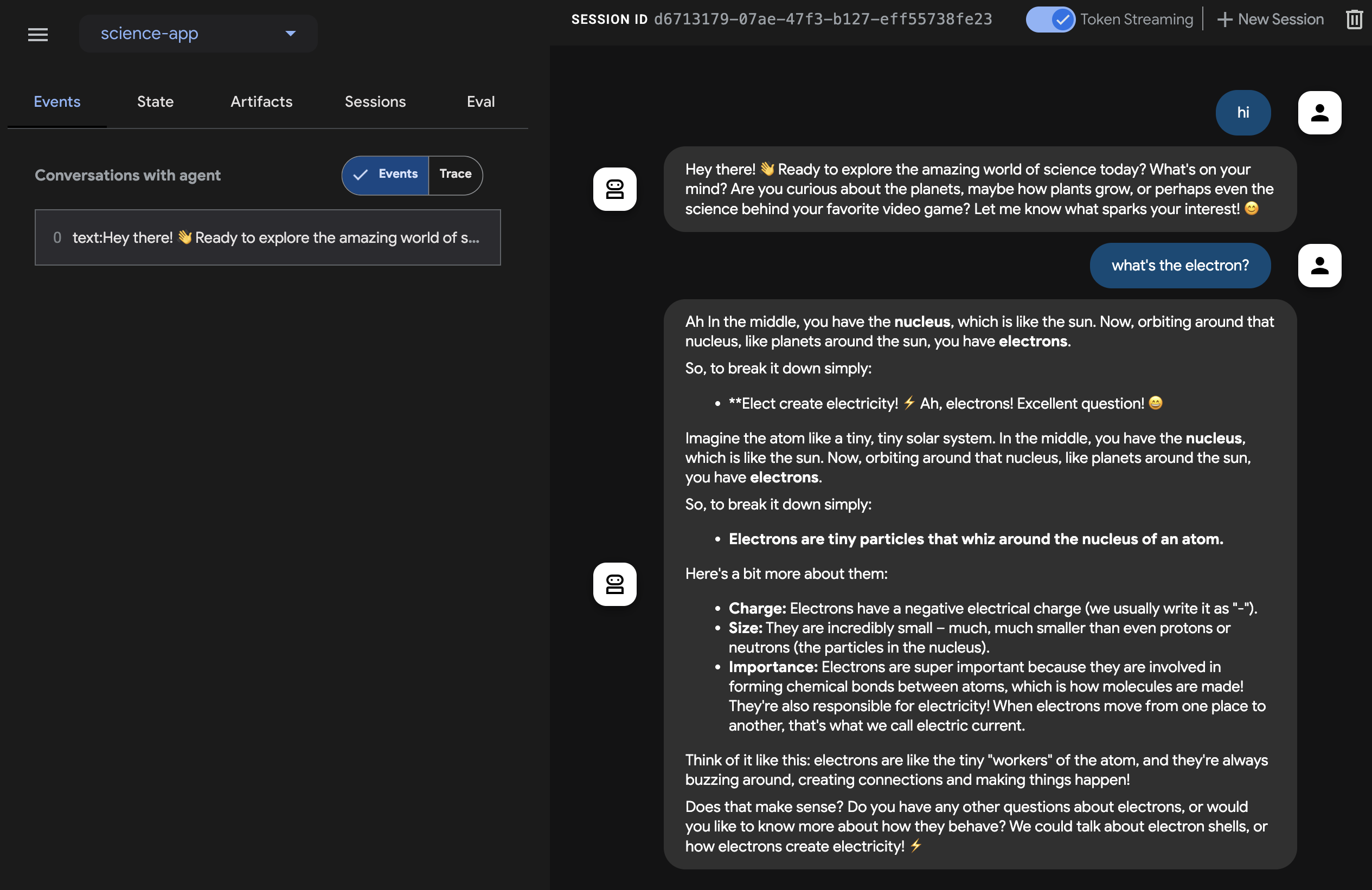
点击麦克风按钮以启用语音输入功能,然后提出一个问题。 What's the electron? 答案会以语音形式实时呈现给您。
要尝试使用视频功能,请重新加载网页浏览器,点击“摄像头”按钮以启用视频输入功能,然后提出诸如“你看到了什么?”之类的问题。系统会回答用户在视频中看到的内容。
**Caveat** (拉丁语,意为“请注意”或“警告”)
- 您无法使用文本聊天功能与那些仅支持原生音频处理的模型进行交互。当您尝试向这些模型输入文本消息时,系统会显示错误提示。
adk web.
停止使用该工具。
通过按下相应的按钮来停止该工具。 Ctrl-C 在控制台上显示(或输出)。
使用自定义的实时音频应用程序来运行代理程序。
现在,让我们尝试使用该代理以及一个自定义的实时音频应用程序来进行音频流传输。
用于 Live Audio 的 Maven pom.xml 构建文件
将您现有的 `pom.xml` 文件替换为以下内容。
<?xml version="1.0" encoding="UTF-8"?>
<project xmlns="http://maven.apache.org/POM/4.0.0"
  xmlns:xsi="http://www.w3.org/2001/XMLSchema-instance"
  xsi:schemaLocation="http://maven.apache.org/POM/4.0.0 http://maven.apache.org/xsd/maven-4.0.0.xsd">
  <modelVersion>4.0.0</modelVersion>

  <groupId>com.google.adk.samples</groupId>
  <artifactId>google-adk-sample-live-audio</artifactId>
  <version>0.1.0</version>
  <name>Google ADK - Sample - Live Audio</name>
  <description>
    A sample application demonstrating a live audio conversation using ADK,
    runnable via samples.liveaudio.LiveAudioRun.
  </description>
  <packaging>jar</packaging>

  <properties>
    <project.build.sourceEncoding>UTF-8</project.build.sourceEncoding>
    <java.version>17</java.version>
    <auto-value.version>1.11.0</auto-value.version>
    <!-- Main class for exec-maven-plugin -->
    <exec.mainClass>samples.liveaudio.LiveAudioRun</exec.mainClass>
    <google-adk.version>1.14.0</google-adk.version>
  </properties>

  <dependencyManagement>
    <dependencies>
      <dependency>
        <groupId>com.google.cloud</groupId>
        <artifactId>libraries-bom</artifactId>
        <version>26.53.0</version>
        <type>pom</type>
        <scope>import</scope>
      </dependency>
    </dependencies>
  </dependencyManagement>

  <dependencies>
    <dependency>
      <groupId>com.google.adk</groupId>
      <artifactId>google-adk</artifactId>
      <version>${google-adk.version}</version>
    </dependency>
    <dependency>
      <groupId>commons-logging</groupId>
      <artifactId>commons-logging</artifactId>
      <version>1.2</version> <!-- Or use a property if defined in a parent POM -->
    </dependency>
  </dependencies>

  <build>
    <plugins>
      <plugin>
        <groupId>org.apache.maven.plugins</groupId>
        <artifactId>maven-compiler-plugin</artifactId>
        <version>3.13.0</version>
        <configuration>
          <source>${java.version}</source>
          <target>${java.version}</target>
          <parameters>true</parameters>
          <annotationProcessorPaths>
            <path>
              <groupId>com.google.auto.value</groupId>
              <artifactId>auto-value</artifactId>
              <version>${auto-value.version}</version>
            </path>
          </annotationProcessorPaths>
        </configuration>
      </plugin>
      <plugin>
        <groupId>org.codehaus.mojo</groupId>
        <artifactId>build-helper-maven-plugin</artifactId>
        <version>3.6.0</version>
        <executions>
          <execution>
            <id>add-source</id>
            <phase>generate-sources</phase>
            <goals>
              <goal>add-source</goal>
            </goals>
            <configuration>
              <sources>
                <source>.</source>
              </sources>
            </configuration>
          </execution>
        </executions>
      </plugin>
      <plugin>
        <groupId>org.codehaus.mojo</groupId>
        <artifactId>exec-maven-plugin</artifactId>
        <version>3.2.0</version>
        <configuration>
          <mainClass>${exec.mainClass}</mainClass>
          <classpathScope>runtime</classpathScope>
        </configuration>
      </plugin>
    </plugins>
  </build>
</project>
正在开发“Live Audio Run”工具。
创建…… LiveAudioRun.java 归类为……;属于……类别 src/main/java/ 该目录包含以下内容:此工具会在此目录中运行代理程序,并实现实时音频的输入与输出功能。
package samples.liveaudio;

import com.google.adk.agents.LiveRequestQueue;
import com.google.adk.agents.RunConfig;
import com.google.adk.events.Event;
import com.google.adk.runner.Runner;
import com.google.adk.sessions.InMemorySessionService;
import com.google.common.collect.ImmutableList;
import com.google.genai.types.Blob;
import com.google.genai.types.Modality;
import com.google.genai.types.PrebuiltVoiceConfig;
import com.google.genai.types.Content;
import com.google.genai.types.Part;
import com.google.genai.types.SpeechConfig;
import com.google.genai.types.VoiceConfig;
import io.reactivex.rxjava3.core.Flowable;
import java.io.ByteArrayOutputStream;
import java.io.InputStream;
import java.net.URL;
import javax.sound.sampled.AudioFormat;
import javax.sound.sampled.AudioInputStream;
import javax.sound.sampled.AudioSystem;
import javax.sound.sampled.DataLine;
import javax.sound.sampled.LineUnavailableException;
import javax.sound.sampled.Mixer;
import javax.sound.sampled.SourceDataLine;
import javax.sound.sampled.TargetDataLine;
import java.util.UUID;
import java.util.concurrent.ExecutorService;
import java.util.concurrent.ConcurrentHashMap;
import java.util.concurrent.ConcurrentMap;
import java.util.concurrent.Executors;
import java.util.concurrent.Future;
import java.util.concurrent.TimeUnit;
import java.util.concurrent.atomic.AtomicBoolean;
import agents.ScienceTeacherAgent;

/** Main class to demonstrate running the {@link LiveAudioAgent} for a voice conversation. */
public final class LiveAudioRun {
  private final String userId;
  private final String sessionId;
  private final Runner runner;

  private static final javax.sound.sampled.AudioFormat MIC_AUDIO_FORMAT =
      new javax.sound.sampled.AudioFormat(16000.0f, 16, 1, true, false);

  private static final javax.sound.sampled.AudioFormat SPEAKER_AUDIO_FORMAT =
      new javax.sound.sampled.AudioFormat(24000.0f, 16, 1, true, false);

  private static final int BUFFER_SIZE = 4096;

  public LiveAudioRun() {
    this.userId = "test_user";
    String appName = "LiveAudioApp";
    this.sessionId = UUID.randomUUID().toString();

    InMemorySessionService sessionService = new InMemorySessionService();
    this.runner = new Runner(ScienceTeacherAgent.ROOT_AGENT, appName, null, sessionService);

    ConcurrentMap<String, Object> initialState = new ConcurrentHashMap<>();
    var unused =
        sessionService.createSession(appName, userId, initialState, sessionId).blockingGet();
  }

  private void runConversation() throws Exception {
    System.out.println("Initializing microphone input and speaker output...");

    RunConfig runConfig =
        RunConfig.builder()
            .setStreamingMode(RunConfig.StreamingMode.BIDI)
            .setResponseModalities(ImmutableList.of(new Modality("AUDIO")))
            .setSpeechConfig(
                SpeechConfig.builder()
                    .voiceConfig(
                        VoiceConfig.builder()
                            .prebuiltVoiceConfig(
                                PrebuiltVoiceConfig.builder().voiceName("Aoede").build())
                            .build())
                    .languageCode("en-US")
                    .build())
            .build();

    LiveRequestQueue liveRequestQueue = new LiveRequestQueue();

    Flowable<Event> eventStream =
        this.runner.runLive(
            runner.sessionService().createSession(userId, sessionId).blockingGet(),
            liveRequestQueue,
            runConfig);

    AtomicBoolean isRunning = new AtomicBoolean(true);
    AtomicBoolean conversationEnded = new AtomicBoolean(false);
    ExecutorService executorService = Executors.newFixedThreadPool(2);

    // Task for capturing microphone input
    Future<?> microphoneTask =
        executorService.submit(() -> captureAndSendMicrophoneAudio(liveRequestQueue, isRunning));

    // Task for processing agent responses and playing audio
    Future<?> outputTask =
        executorService.submit(
            () -> {
              try {
                processAudioOutput(eventStream, isRunning, conversationEnded);
              } catch (Exception e) {
                System.err.println("Error processing audio output: " + e.getMessage());
                e.printStackTrace();
                isRunning.set(false);
              }
            });

    // Wait for user to press Enter to stop the conversation
    System.out.println("Conversation started. Press Enter to stop...");
    System.in.read();

    System.out.println("Ending conversation...");
    isRunning.set(false);

    try {
      // Give some time for ongoing processing to complete
      microphoneTask.get(2, TimeUnit.SECONDS);
      outputTask.get(2, TimeUnit.SECONDS);
    } catch (Exception e) {
      System.out.println("Stopping tasks...");
    }

    liveRequestQueue.close();
    executorService.shutdownNow();
    System.out.println("Conversation ended.");
  }

  private void captureAndSendMicrophoneAudio(
      LiveRequestQueue liveRequestQueue, AtomicBoolean isRunning) {
    TargetDataLine micLine = null;
    try {
      DataLine.Info info = new DataLine.Info(TargetDataLine.class, MIC_AUDIO_FORMAT);
      if (!AudioSystem.isLineSupported(info)) {
        System.err.println("Microphone line not supported!");
        return;
      }

      micLine = (TargetDataLine) AudioSystem.getLine(info);
      micLine.open(MIC_AUDIO_FORMAT);
      micLine.start();

      System.out.println("Microphone initialized. Start speaking...");

      byte[] buffer = new byte[BUFFER_SIZE];
      int bytesRead;

      while (isRunning.get()) {
        bytesRead = micLine.read(buffer, 0, buffer.length);

        if (bytesRead > 0) {
          byte[] audioChunk = new byte[bytesRead];
          System.arraycopy(buffer, 0, audioChunk, 0, bytesRead);

          Blob audioBlob = Blob.builder().data(audioChunk).mimeType("audio/pcm").build();

          liveRequestQueue.realtime(audioBlob);
        }
      }
    } catch (LineUnavailableException e) {
      System.err.println("Error accessing microphone: " + e.getMessage());
      e.printStackTrace();
    } finally {
      if (micLine != null) {
        micLine.stop();
        micLine.close();
      }
    }
  }

  private void processAudioOutput(
      Flowable<Event> eventStream, AtomicBoolean isRunning, AtomicBoolean conversationEnded) {
    SourceDataLine speakerLine = null;
    try {
      DataLine.Info info = new DataLine.Info(SourceDataLine.class, SPEAKER_AUDIO_FORMAT);
      if (!AudioSystem.isLineSupported(info)) {
        System.err.println("Speaker line not supported!");
        return;
      }

      final SourceDataLine finalSpeakerLine = (SourceDataLine) AudioSystem.getLine(info);
      finalSpeakerLine.open(SPEAKER_AUDIO_FORMAT);
      finalSpeakerLine.start();

      System.out.println("Speaker initialized.");

      for (Event event : eventStream.blockingIterable()) {
        if (!isRunning.get()) {
          break;
        }

        AtomicBoolean audioReceived = new AtomicBoolean(false);
        processEvent(event, audioReceived);

        event.content().ifPresent(content -> content.parts().ifPresent(parts -> parts.forEach(part -> playAudioData(part, finalSpeakerLine))));
      }

      speakerLine = finalSpeakerLine; // Assign to outer variable for cleanup in finally block
    } catch (LineUnavailableException e) {
      System.err.println("Error accessing speaker: " + e.getMessage());
      e.printStackTrace();
    } finally {
      if (speakerLine != null) {
        speakerLine.drain();
        speakerLine.stop();
        speakerLine.close();
      }
      conversationEnded.set(true);
    }
  }

  private void playAudioData(Part part, SourceDataLine speakerLine) {
    part.inlineData()
        .ifPresent(
            inlineBlob ->
                inlineBlob
                    .data()
                    .ifPresent(
                        audioBytes -> {
                          if (audioBytes.length > 0) {
                            System.out.printf(
                                "Playing audio (%s): %d bytes%n",
                                inlineBlob.mimeType(),
                                audioBytes.length);
                            speakerLine.write(audioBytes, 0, audioBytes.length);
                          }
                        }));
  }

  private void processEvent(Event event, java.util.concurrent.atomic.AtomicBoolean audioReceived) {
    event
        .content()
        .ifPresent(
            content ->
                content
                    .parts()
                    .ifPresent(parts -> parts.forEach(part -> logReceivedAudioData(part, audioReceived))));
  }

  private void logReceivedAudioData(Part part, AtomicBoolean audioReceived) {
    part.inlineData()
        .ifPresent(
            inlineBlob ->
                inlineBlob
                    .data()
                    .ifPresent(
                        audioBytes -> {
                          if (audioBytes.length > 0) {
                            System.out.printf(
                                "    Audio (%s): received %d bytes.%n",
                                inlineBlob.mimeType(),
                                audioBytes.length);
                            audioReceived.set(true);
                          } else {
                            System.out.printf(
                                "    Audio (%s): received empty audio data.%n",
                                inlineBlob.mimeType());
                          }
                        }));
  }

  public static void main(String[] args) throws Exception {
    LiveAudioRun liveAudioRun = new LiveAudioRun();
    liveAudioRun.runConversation();
    System.out.println("Exiting Live Audio Run.");
  }
}
运行“Live Audio Run”工具。
要运行 Live Audio Run 工具,请在相应的命令行或终端中输入以下命令: adk-agents directory:
然后你应该会看到:
$ mvn compile exec:java
...
Initializing microphone input and speaker output...
Conversation started. Press Enter to stop...
Speaker initialized.
Microphone initialized. Start speaking...
通过这条消息,该工具已准备好接收语音输入。你可以向代理提出问题,例如: What's the electron?.
注意: 以下内容可能包含敏感信息或警告提示。请在阅读前仔细考虑相关风险。
当你发现该代理程序一直在自动运行且无法停止时,可以尝试使用耳机来抑制回声现象。
接下来,请查看…… 配置 用于设置语音识别功能以及开启/关闭人体检测功能。 工具 为了给您的在线客服人员提供所需的工具。