获取 ADK 工具的操作确认信息
某些代理工作流程需要确认才能进行决策、验证、安全处理或日常监督。在这种情况下,在继续执行工作流程之前,你需要从人类操作员或监督系统那里获得回复。 工具 确认 Agent Development Kit(ADK)中的这一功能允许 ADK 工具暂停自身的执行过程,与用户或其他系统进行交互以获取确认信息,或在继续执行之前收集结构化数据。您可以通过以下方式使用该功能:
- 布尔值确认(用于表示用户是否同意或确认某项操作): 您可以配置一个带有确认标志(confirmation flag)的工具,或者使用特定的提供者(provider)来执行相关操作。该选项会暂停工具的执行,直到用户给出“是”(yes)或“否”(no)的确认回复之后,工具才会继续运行。
- 高级确认功能(Advanced Confirmation): 对于那些需要结构化数据响应的场景,您可以配置一个工具,并为其设置一个文本提示,以说明确认流程以及预期的响应内容。
该特性目前仅在 TypeScript、Go 和 Kotlin 中处于实验性阶段(即尚未正式发布或稳定使用)。
“工具确认”(Tool Confirmation)功能在 ADK TypeScript、ADK Go 和 ADK Kotlin 中仍处于实验阶段。关于所有语言的相关信息,请参阅……(此处应提供具体文档或链接)。 已知的局限性.
您可以配置请求如何被传递给用户,同时系统也可以使用这些配置。 远程响应(remote responses) 信息是通过 ADK 以及服务器的 REST API 发送的。当使用 ADK 的 Web 用户界面中的确认功能时,系统会向用户显示一个对话框,要求用户输入相关信息(如图 1 所示)。
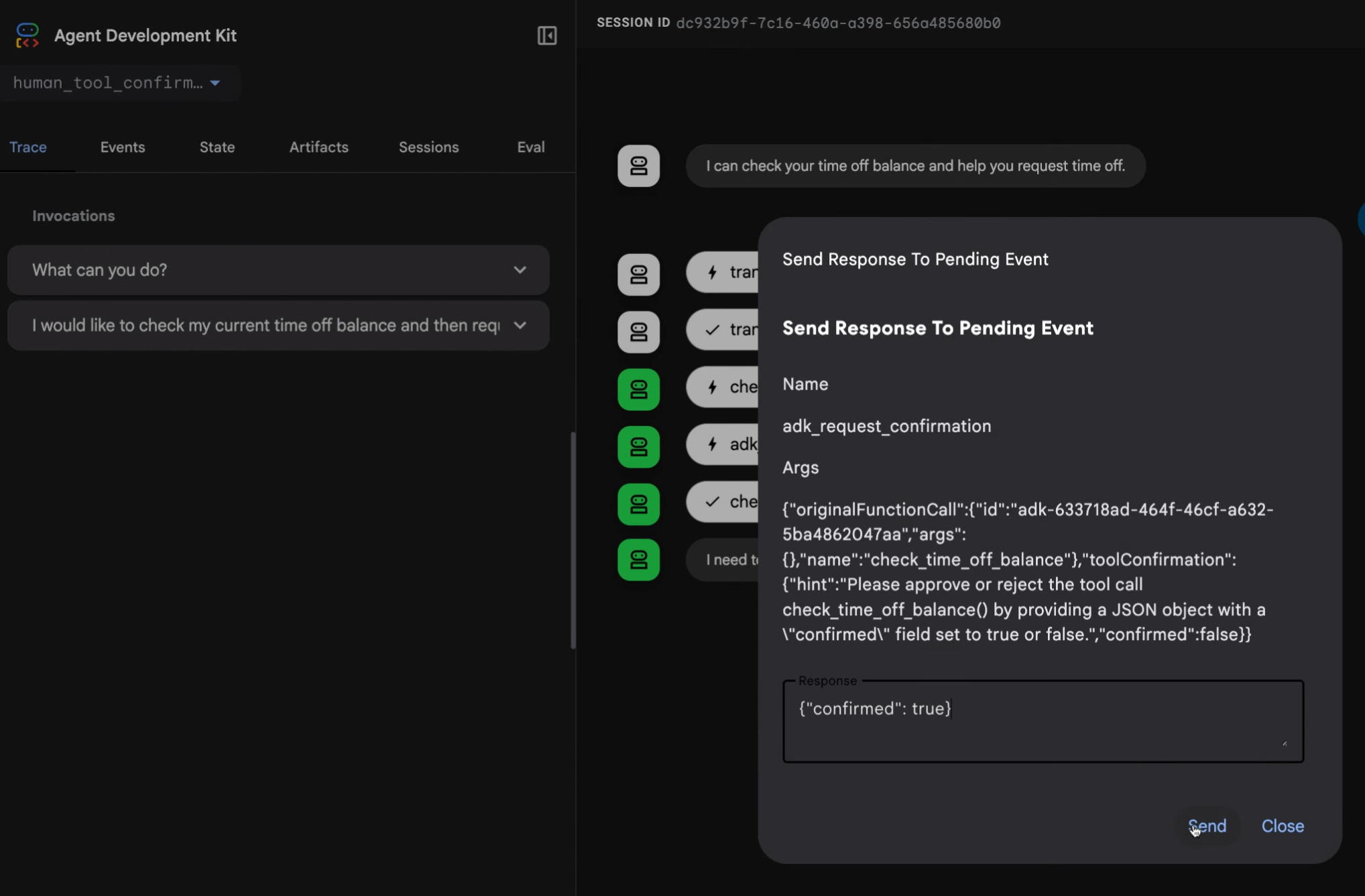
图 1. 示例:使用高级工具实现方式来生成确认响应请求的对话框。
以下部分介绍了如何在需要确认的场景中使用此功能。如需完整的代码示例,请参阅…… human_toolconfirmation 示例:还有其他方法可以将用户的输入整合到您的代理工作流程中。有关更多详细信息,请参阅…… “人在回路中”(Human-in-the-loop)是一种人工智能(AI)系统设计方法,强调在AI系统做出决策或执行任务时,需要人类的参与和监督。这种方法认为,尽管AI在某些方面可能具有很高的效率和准确性,但人类的判断力、创造力以及对情境的理解能力仍然是不可或缺的。通过人在回路中的机制,可以确保AI系统的决策符合人类的价值观、道德标准和社会需求,同时也可以及时发现和纠正AI可能产生的错误或偏差。 代理模式(Agent Pattern)。
布尔值形式的确认(即需要用户输入“是”或“否”来表示同意)。
当你的工具只需要一个简单的……(此处“simple”指代的具体内容未在原文中明确说明,因此保留原文) yes 或者 no 根据用户的需求,你可以添加一个确认步骤。在 Python、Go 和 Java 中,你可以通过将相关代码封装到一个函数或类中来实现这一功能。 FunctionTool 类(class)的设置(setting)
require_confirmation 需要输入的参数(或等效的输入项)。 True在 Kotlin 中,你可以通过以下方式来设置相关值:
requireConfirmation = true 在工具函数的…… @Tool 在 TypeScript 中,你需要手动在代码中实现这种逻辑。 execute ```csharp
function
{
using (
// 在这里添加需要使用的类或模块
)
{
// 在这里编写代码
}
}
``` ToolContext.
以下示例展示了如何启用布尔值确认功能:
root_agent = Agent(
    # ...
    tools = [
        # Set require_confirmation to True to require user confirmation
        # for the tool call.
        FunctionTool(reimburse, require_confirmation=True),
    ],
    # ...
)

# This implementation method requires minimal code, but is limited to simple
# approvals from the user or confirming system. For a complete example of this
# approach, see the following code sample for a more detailed example:
# https://github.com/google/adk-python/blob/main/contributing/samples/hitl/human_tool_confirmation/agent.py
注意:
ADK for TypeScript 目前需要用户在工具内部手动实现确认逻辑(即那些用于验证用户输入或执行某些操作的代码)。 execute function.
/**
 * A reimbursement tool with dynamic confirmation logic.
 */
export const reimburseTool = new FunctionTool({
  name: 'reimburse',
  description: 'Reimburse an amount. Large amounts (>1000) require manager approval.',
  parameters: z.object({
    amount: z.coerce.number().describe('The amount to reimburse.'),
  }),
  execute: async ({amount}, toolContext) => {
    // 1. Check if we already have a confirmed response.
    if (toolContext?.toolConfirmation?.confirmed) {
      const isLarge = amount > 1000;
      return {
        status: 'SUCCESS',
        message: isLarge
          ? `Large reimbursement of ${amount} approved by manager and processed.`
          : `Reimbursement of ${amount} has been successfully processed.`,
      };
    }

    // 2. Request a tool confirmation.
    const isLarge = amount > 1000;
    toolContext?.requestConfirmation({
      hint: isLarge
        ? `The amount ${amount} exceeds the $1000 limit and requires manager approval.`
        : `Do you want to reimburse ${amount}?`,
      payload: {amount},
    });

    // 3. Return a status that tells the agent we are waiting.
    // Note: The model won't see this until the turn resumes after confirmation.
    return {
      status: isLarge ? 'AWAITING_MANAGER_APPROVAL' : 'AWAITING_CONFIRMATION',
      message: 'This request requires approval to proceed.',
    };
  },
});

export const rootAgent = new LlmAgent({
  name: 'Finance_Assistant',
  model: 'gemini-flash-latest',
  instruction: `You are a Finance Assistant.
  - You MUST use the 'reimburse' tool for ALL reimbursement requests.
  - MANDATORY: Every tool call MUST be accompanied by a text response in the same message.
  - THRESHOLD LOGIC:
    - For amounts <= 1000: Say "I am initiating the reimbursement request for [amount]. Please confirm it to proceed."
    - For amounts > 1000: Say "I am initiating the reimbursement request for [amount]. Since this exceeds $1000, manager approval is required. Please confirm the request to submit it for review."
  - EXAMPLES:
    User: "Reimburse me $45"
    Model: "I am initiating the reimbursement request for 45. Please confirm it to proceed." [Tool Call: reimburse(amount=45)]

    User: "Reimburse me $2500"
    Model: "I am initiating the reimbursement request for 2500. Since this exceeds $1000, manager approval is required. Please confirm the request to submit it for review." [Tool Call: reimburse(amount=2500)]
  - If the user provides a currency symbol (like $), ignore it and pass only the number to the tool.
  - In the Web UI, the user will see a 'Confirm' button. In the terminal, the user should simulate a confirmation response.`,
  tools: [reimburseTool],
});
reimburseTool, _ := functiontool.New(functiontool.Config{
    Name:        "reimburse",
    Description: "Reimburse an amount",
    // Set RequireConfirmation to true to require user confirmation
    // for the tool call.
    RequireConfirmation: true,
}, func(ctx agent.Context, args ReimburseArgs) (ReimburseResult, error) {
    // actual implementation
    return ReimburseResult{Status: "ok"}, nil
})

rootAgent, _ := llmagent.New(llmagent.Config{
    // ...
    Tools: []tool.Tool{reimburseTool},
})
class ReimbursementTools {
    /** Reimburse an amount. */
    @Tool(requireConfirmation = true) // Pause for user confirmation before every call.
    fun reimburse(
        @Param("The amount to reimburse.") amount: Int,
    ): Map<String, Any?> = mapOf("status" to "ok", "reimbursedAmount" to amount)
}

val reimbursementAgent =
    LlmAgent(
        name = "reimbursement_agent",
        model = Gemini(name = "gemini-flash-latest"),
        tools = ReimbursementTools().generatedTools(),
    )
需要确认的功能
您可以通过使用一个函数来修改确认要求的行为;该函数会根据工具的输入返回一个布尔值(true 或 false)。在 TypeScript 中,可以通过添加条件逻辑来实现这一点。 execute 在 Kotlin 中,`function` 是用于定义函数的关键字。 @Tool 注释的标志(annotation flag)是一个编译时常量(compile-time constant),因此相关的条件逻辑(conditional logic)需要被放在工具函数(tool function)的内部。
async def confirmation_threshold(
    amount: int, tool_context: ToolContext
) -> bool:
  """Returns true if the amount is greater than 1000."""
  return amount > 1000

root_agent = Agent(
    # ...
    tools = [
        # Pass the threshold function to dynamically require confirmation
        FunctionTool(reimburse, require_confirmation=confirmation_threshold),
    ],
    # ...
)
reimburseTool, _ := functiontool.New(functiontool.Config{
    Name:        "reimburse",
    Description: "Reimburse an amount",
    // RequireConfirmationProvider allows for dynamic determination
    // of whether user confirmation is needed.
    RequireConfirmationProvider: func(args ReimburseArgs) bool {
        return args.Amount > 1000
    },
}, func(ctx agent.Context, args ReimburseArgs) (ReimburseResult, error) {
    // actual implementation
    return ReimburseResult{Status: "ok"}, nil
})
// In ADK Java, dynamic threshold confirmation logic is evaluated directly
// inside the tool logic using the ToolContext rather than via a lambda parameter.
public Map<String, Object> reimburse(
    @Schema(name="amount") int amount, ToolContext toolContext) {

  // 1. Dynamic threshold check
  if (amount > 1000) {
    Optional<ToolConfirmation> toolConfirmation = toolContext.toolConfirmation();
    if (toolConfirmation.isEmpty()) {
       toolContext.requestConfirmation("Amount > 1000 requires approval.");
       return Map.of("status", "Pending manager approval.");
    } else if (!toolConfirmation.get().confirmed()) {
       return Map.of("status", "Reimbursement rejected.");
    }
  }

  // 2. Proceed with actual tool logic
  return Map.of("status", "ok", "reimbursedAmount", amount);
}

LlmAgent rootAgent = LlmAgent.builder()
    // ...
    .tools(
        // No requireConfirmation flag is set because the custom threshold
        // logic is already handled inside the method!
        FunctionTool.create(this, "reimburse")
    )
    // ...
    .build();
class ReimbursementTools {
    /** Reimburse an amount, requiring manager approval above a threshold. */
    @Tool
    fun reimburse(
        context: ToolContext,
        @Param("The amount to reimburse.") amount: Int,
    ): Map<String, Any?> {
        // The @Tool annotation's requireConfirmation flag is a compile-time constant,
        // so the threshold is evaluated here using the ToolContext instead.
        if (amount > 1000) {
            val confirmation = context.toolConfirmation
            if (confirmation == null) {
                context.requestConfirmation(hint = "Amount > 1000 requires approval.")
                // Return an intermediate status while the confirmation is pending.
                return mapOf("status" to "Pending manager approval.")
            }
            if (!confirmation.confirmed) {
                return mapOf("status" to "Reimbursement rejected.")
            }
        }
        return mapOf("status" to "ok", "reimbursedAmount" to amount)
    }
}
注意:
The @Tool “annotation’s”(这里的“’s”应该是拼写错误,正确的形式应该是“’s”)…… requireConfirmation `flag` 是一个编译时常量(即在编译过程中确定的值),因此阈值是在工具内部使用该常量进行计算的。
ToolContext就像在 ADK Java 中一样。
高级确认功能
当工具确认需要向用户提供更多详细信息或更复杂的响应时,应使用 `toolconfirmation` 实现方式。这种方法可以扩展系统的功能,以满足用户的各种需求。
ToolContext 该功能允许为用户的请求添加文本描述,并支持更复杂的响应数据格式。在采用这种方式实现工具确认机制时,您可以暂停工具的执行、请求特定信息,然后再使用提供的数据继续执行该工具。
这个确认流程包括两个阶段: 1. **请求阶段**:系统会生成一个输入请求,并将其发送给用户(要求用户做出响应); 2. **响应阶段**:系统接收用户返回的数据,并对这些数据进行处理。
确认定义(Confirmation definition)
在创建具有高级确认功能的工具时,请使用…… Tool Context Request Confirmation 名为 `method with` 的方法 hint 和 payload parameters:
hint:这是一条描述性信息,用于向用户说明需要他们完成什么。payload:您期望接收到的数据结构。该数据结构必须能够被序列化为 JSON 格式的字符串。
有关这种方法的完整示例,请参见……
human_toolconfirmation
代码示例:请注意,在获取确认信息的过程中,代理工作流工具的执行会暂停。收到确认信息后,您可以访问相应的确认响应。 tool_confirmation.payload 然后继续执行工作流(workflow)。
以下代码展示了一个工具的实现示例,该工具用于处理员工的休假申请:
def request_time_off(days: int, tool_context: ToolContext):
    """Request day off for the employee."""
    # ...
    tool_confirmation = tool_context.tool_confirmation
    if not tool_confirmation:
        tool_context.request_confirmation(
            hint=(
                'Please approve or reject the tool call request_time_off() by'
                ' responding with a FunctionResponse with an expected'
                ' ToolConfirmation payload.'
            ),
            payload={
                'approved_days': 0,
            },
        )
        # Return intermediate status indicating that the tool is waiting for
        # a confirmation response:
        return {'status': 'Manager approval is required.'}

    approved_days = tool_confirmation.payload['approved_days']
    approved_days = min(approved_days, days)
    if approved_days == 0:
        return {'status': 'The time off request is rejected.', 'approved_days': 0}
    return {
        'status': 'ok',
        'approved_days': approved_days,
    }
/**
 * A tool that requests time off for an employee.
 * It uses the Advanced Confirmation pattern to request manager approval.
 */
export const requestTimeOffTool = new FunctionTool({
  name: 'request_time_off',
  description: 'Request days off for the employee.',
  parameters: z.object({
    days: z.number().describe('The number of days requested.'),
  }),
  execute: async ({days}, toolContext) => {
    const confirmation = toolContext?.toolConfirmation;

    if (!confirmation) {
      // Step 1: Request confirmation with a payload
      toolContext?.requestConfirmation({
        hint:
          'Please approve or reject the tool call request_time_off() by ' +
          'responding with a FunctionResponse with an expected ' +
          'ToolConfirmation payload.',
        payload: {
          approved_days: 0,
        },
      });

      // Return a descriptive status to the agent
      return {
        status: 'PENDING_MANAGER_APPROVAL',
        message: `A request for ${days} days is pending manager approval.`,
      };
    }

    // Step 2: Process the confirmation response
    if (!confirmation.confirmed) {
      return {
        status: 'CANCELLED',
        message: 'The request was cancelled by the user.',
      };
    }

    let approvedDays = (confirmation.payload as any)['approved_days'] as number;
    approvedDays = Math.min(approvedDays, days);

    if (approvedDays === 0) {
      return {
        status: 'REJECTED',
        message: 'The time off request was rejected by the manager.',
        approved_days: 0,
      };
    }

    return {
      status: 'SUCCESS',
      message: `The request for ${days} days was approved (Total approved: ${approvedDays}).`,
      approved_days: approvedDays,
    };
  },
});

export const rootAgent = new LlmAgent({
  name: 'HR_Assistant',
  model: 'gemini-flash-latest',
  instruction: `You are an HR Assistant.
  1. Use the 'request_time_off' tool to help employees with leave requests.
  2. MANDATORY: Every tool call MUST be accompanied by a text response in the same message.
  3. EXAMPLE:
     User: "I want 5 days off"
     Model: "I am initiating your leave request for 5 days. Management approval is required, so please confirm this request." [Tool Call: request_time_off(days=5)]
  4. In the terminal, if they want to 'confirm', tell them to simulate a confirmation response.
  5. Once confirmed, the system will automatically provide the result of the approval.`,
  tools: [requestTimeOffTool],
});
func requestTimeOff(ctx agent.Context, args RequestTimeOffArgs) (map[string]any, error) {
    confirmation := ctx.ToolConfirmation()
    if confirmation == nil {
        ctx.RequestConfirmation(
            "Please approve or reject the tool call requestTimeOff() by "+
            "responding with a FunctionResponse with an expected "+
            "ToolConfirmation payload.",
            map[string]any{"approved_days": 0},
        )
        return map[string]any{"status": "Manager approval is required."}, nil
    }

    payload := confirmation.Payload.(map[string]any)
    // Values in map[string]any from JSON are float64 by default in Go
    approvedDays := int(payload["approved_days"].(float64))
    approvedDays = min(approvedDays, args.Days)

    if approvedDays == 0 {
        return map[string]any{"status": "The time off request is rejected.", "approved_days": 0}, nil
    }

    return map[string]any{
        "status": "ok",
        "approved_days": approvedDays,
    }, nil
}
public Map<String, Object> requestTimeOff(
    @Schema(name="days") int days,
    ToolContext toolContext) {
    // Request day off for the employee.
    // ...
    Optional<ToolConfirmation> toolConfirmation = toolContext.toolConfirmation();
    if (toolConfirmation.isEmpty()) {
        toolContext.requestConfirmation(
            "Please approve or reject the tool call requestTimeOff() by " +
            "responding with a FunctionResponse with an expected " +
            "ToolConfirmation payload.",
            Map.of("approved_days", 0)
        );
        // Return intermediate status indicating that the tool is waiting for
        // a confirmation response:
        return Map.of("status", "Manager approval is required.");
    }

    Map<String, Object> payload = (Map<String, Object>) toolConfirmation.get().payload();
    int approvedDays = (int) payload.get("approved_days");
    approvedDays = Math.min(approvedDays, days);

    if (approvedDays == 0) {
        return Map.of("status", "The time off request is rejected.", "approved_days", 0);
    }

    return Map.of(
        "status", "ok",
        "approved_days", approvedDays
    );
}
class TimeOffTools {
    /** Request day off for the employee. */
    @Tool
    fun requestTimeOff(
        context: ToolContext,
        @Param("The number of days requested.") days: Int,
    ): Map<String, Any?> {
        val confirmation = context.toolConfirmation
        if (confirmation == null) {
            context.requestConfirmation(
                hint =
                    "Please approve or reject the tool call requestTimeOff() by responding " +
                        "with a FunctionResponse with an expected ToolConfirmation payload.",
                payload = mapOf("approved_days" to 0),
            )
            // Return an intermediate status indicating that the tool is waiting for
            // a confirmation response:
            return mapOf("status" to "Manager approval is required.")
        }

        // The payload comes back decoded from JSON, so the number may arrive as any
        // Number subtype. Read it through Number rather than casting straight to Int.
        val payload = confirmation.payload as? Map<*, *>
        val approvedDays =
            minOf((payload?.get("approved_days") as? Number)?.toInt() ?: 0, days)
        if (approvedDays == 0) {
            return mapOf("status" to "The time off request is rejected.", "approved_days" to 0)
        }
        return mapOf("status" to "ok", "approved_days" to approvedDays)
    }
}
通过 REST API 进行远程确认
如果某个工作流程没有提供用于人工确认的界面,那么可以通过命令行界面来完成确认操作,或者通过电子邮件、聊天应用程序等其他渠道来进行确认。为了完成确认过程,用户或调用该工具的应用程序需要发送相应的指令或信息。
FunctionResponse 包含工具确认数据的相关事件。
您可以将请求发送到 ADK API 服务器。 /run 或者 /run_sse 该数据可以发送到特定的端点(endpoint),或者直接发送到 ADK 运行器(ADK runner)。以下示例使用了…… curl 用于将确认信息发送给……的命令。 /run_sse `endpoint:`
 curl -X POST http://localhost:8000/run_sse \
 -H "Content-Type: application/json" \
 -d '{
    "app_name": "human_tool_confirmation",
    "user_id": "user",
    "session_id": "7828f575-2402-489f-8079-74ea95b6a300",
    "new_message": {
        "parts": [
            {
                "function_response": {
                    "id": "adk-13b84a8c-c95c-4d66-b006-d72b30447e35",
                    "name": "adk_request_confirmation",
                    "response": {
                        "confirmed": true,
                        "payload": {
                            "approved_days": 5
                        }
                    }
                }
            }
        ],
        "role": "user"
    }
}'
基于 REST 的确认响应必须满足以下要求:
- The
id在……里面;在……期间function_response应该与……相匹配。function_call_idfrom theadk_request_confirmationFunctionCall`event.` - The
name应该adk_request_confirmation. -
The
response该对象包含……confirmed状态以及任何其他相关信息。payloaddata.注意:需要使用“简历”功能进行确认。
如果您的 ADK 代理工作流程已按照以下要求进行配置: 简历 除了该功能外,您还必须提供调用 ID(Invocation ID)。
invocation_id该参数需要与确认响应一起发送。您提供的调用 ID 必须与生成确认请求的同一调用相对应;否则,系统会使用该确认响应启动一个新的调用。如果您的代理使用了“恢复”(Resume)功能,请考虑将调用 ID 作为参数包含在确认请求中,以便该 ID 可以随响应一起被发送。有关使用“恢复”功能的更多详细信息,请参阅…… 恢复那些已停止工作的代理(agents)。.
已知的局限性
该工具的确认功能存在以下限制:
- DatabaseSessionService 此功能不支持该操作。
- VertexAiSessionService 此功能不支持该操作。
下一步骤
有关为代理工作流程构建 ADK 工具的更多信息,请参阅…… 函数 工具.