插件(Plugins)
在 Agent Development Kit (ADK) 中,插件是一种自定义代码模块,可以通过回调钩子在代理工作流程的各个阶段被执行。您可以使用插件来实现那些适用于整个代理工作流程的功能。插件的一些典型应用场景如下:
- 日志记录与跟踪(Logging and Tracing):为代理(agent)、工具以及生成式 AI 模型的活动创建详细的日志记录,以便进行调试和性能分析。
- 策略执行(Policy enforcement):实施安全防护措施,例如编写一个函数来检查用户是否具有使用特定工具的权限;如果用户没有权限,则阻止该工具的执行。
- 监控与指标:收集并导出与令牌使用情况、执行时间以及调用次数相关的指标数据,将这些数据传输到 Prometheus 等监控系统中。 Google Cloud Observability(简称“GCO”)是 Google 提供的一套用于监控、分析和优化云服务性能的工具和服务。通过 GCO,用户可以实时监控云资源的运行状态,及时发现潜在的问题和性能瓶颈,从而提高云服务的可用性和稳定性。 (前身为 Stackdriver)。
- 响应缓存(Response caching):检查某个请求之前是否已经被提交过,这样你就可以返回一个缓存的响应,从而避免使用那些计算成本高或耗时较长的 AI 模型或工具。
- 请求或响应内容的修改:动态地向 AI 模型的提示内容中添加信息,或标准化工具的输出结果。
提示:为了使用安全功能,请使用插件(Plugins)。
在实施安全防护措施和政策时,建议使用 ADK 插件(ADK Plugins),因为它们比传统的回调机制(Callbacks)具有更好的模块化和灵活性。详情请参阅…… 用于安全防护机制的回调函数(Callbacks)和插件(Plugins).
提示:ADK(Android Development Kit)集成
有关 ADK 的预构建插件及其他集成方案的列表,请参见…… 工具与集成(Tools and Integrations).
插件(Plugins)是如何工作的?
ADK插件用于扩展(该功能/系统等)。 BasePlugin 该类包含一个或多个(元素/对象等)。
callback 这些方法用于指定插件应在代理生命周期的哪个阶段被执行。您可以通过将插件注册到代理中,将其集成到代理中。 Runner 在 Python 中,你可以使用 `class` 关键字来定义一个类。 App `object`。有关如何在您的代理应用程序中触发插件以及触发位置的更多信息,请参阅……
插件回调钩子(Plugin callback hooks).
该插件的功能是基于……(即:该插件的功能是基于某个基础或前提进行开发的)。
回调函数(Callbacks)这是 ADK 可扩展架构中的一个关键设计元素。虽然典型的 Agent Callback 是在……上配置的。 一个代理,一个工具 for a 具体任务该插件已成功注册。 一次;仅仅一次,在……上 Runner 或者使用 Python 来实现…… App它的回调函数会被执行。 在全球范围内;普遍地 该插件会发送消息给由该运行器管理的所有代理(agent)、工具(tool)以及大型语言模型(LLM)的调用请求。插件允许你将相关的回调函数打包在一起,以便在整个工作流程中统一使用。因此,插件是实现那些需要贯穿整个代理应用程序的功能的理想解决方案。
预构建的插件(Prebuilt Plugins)
ADK 提供了多个插件,您可以立即将这些插件添加到您的代理工作流程中。
- “反射与重试工具”(Reflect and Retry Tools)该工具能够检测工具运行中的故障,并智能地重新发起相应的请求(即重新尝试执行那些失败的工具操作)。
- BigQuery Analytics: 该功能支持通过 BigQuery 进行代理日志记录与数据分析。
- Model Armor将用户的输入以及模型的输出与 Google Cloud Model Armor 模板进行比对(即验证这些数据是否符合预定义的安全标准)。
- 上下文过滤器(Context Filter): 用于过滤生成式人工智能(Generative AI)生成的文本数据,以减小其体积(即减少文本的长度或文件的大小)。
- 全局指令(Global Instruction)该插件在应用程序(App)层面提供了全局指令功能。
- 将文件保存为“工件”(Artifacts)。将用户消息中包含的文件保存为“Artifacts”(即备份或存档文件)。
- 自动追踪(Auto Tracing)将这些函数封装到你的代理程序所使用的自定义包中,并通过 OpenTelemetry 的 Span 机制进行追踪(即记录这些函数的执行过程)。
- 多模态工具的结果让我们让函数工具直接将内容部分返回给模型。
- 日志记录(Logging)在每个代理工作流程的回调点记录重要信息。
- 调试日志记录(Debug Logging)每次调用函数时,都会将完整的调试信息捕获并保存到一个 YAML 文件中。
- “反思与重试模型”(Reflect and Retry Model)当模型的响应以错误信息(例如格式错误的函数调用)结束时,该机制会要求模型重新尝试。
- “工具调用完整性”(Tool Call Integrity)使用一个密钥对存储在会话中的每个函数调用进行签名;只有当该函数调用的签名通过验证后,才会运行相应的工具。作为工作流节点运行的工具则不会被检查。
请查看…… ADK集成 该页面提供了更多适用于您的代理人员的原生插件(native plugins)和第三方插件(third-party plugins)。
定义并注册插件(Plugins)。
本节介绍了如何定义插件类,并将它们注册为代理工作流程的一部分。有关完整的代码示例,请参见…… Plugin Basic 在仓库中。
创建 `Plugin` 类
首先,需要对现有的代码进行扩展(即添加新的功能或修改现有的部分)。 BasePlugin 创建一个类(class),并添加一个或多个成员(member)。 callback
方法(methods),如以下代码示例所示:
from google.adk.agents.base_agent import BaseAgent
from google.adk.agents.callback_context import CallbackContext
from google.adk.models.llm_request import LlmRequest
from google.adk.plugins.base_plugin import BasePlugin

class CountInvocationPlugin(BasePlugin):
    """A custom plugin that counts agent and tool invocations."""

    def __init__(self) -> None:
        """Initialize the plugin with counters."""
        super().__init__(name="count_invocation")
        self.agent_count: int = 0
        self.tool_count: int = 0
        self.llm_request_count: int = 0

    async def before_agent_callback(
        self, *, agent: BaseAgent, callback_context: CallbackContext
    ) -> None:
        """Count agent runs."""
        self.agent_count += 1
        print(f"[Plugin] Agent run count: {self.agent_count}")

    async def before_model_callback(
        self, *, callback_context: CallbackContext, llm_request: LlmRequest
    ) -> None:
        """Count LLM requests."""
        self.llm_request_count += 1
        print(f"[Plugin] LLM request count: {self.llm_request_count}")
import { BaseAgent, BasePlugin, Context } from "@google/adk";
import type { LlmRequest, LlmResponse } from "@google/adk";
import type { Content } from "@google/genai";


/**
 * A custom plugin that counts agent and tool invocations.
 */
export class CountInvocationPlugin extends BasePlugin {
    public agentCount = 0;
    public toolCount = 0;
    public llmRequestCount = 0;

    constructor() {
        super("count_invocation");
    }

    /**
     * Count agent runs.
     */
    async beforeAgentCallback(
        agent: BaseAgent,
        context: Context
    ): Promise<Content | undefined> {
        this.agentCount++;
        console.log(`[Plugin] Agent run count: ${this.agentCount}`);
        return undefined;
    }

    /**
     * Count LLM requests.
     */
    async beforeModelCallback(
        context: Context,
        llmRequest: LlmRequest
    ): Promise<LlmResponse | undefined> {
        this.llmRequestCount++;
        console.log(`[Plugin] LLM request count: ${this.llmRequestCount}`);
        return undefined;
    }
}
import com.google.adk.agents.BaseAgent;
import com.google.adk.agents.CallbackContext;
import com.google.adk.models.LlmRequest;
import com.google.adk.models.LlmResponse;
import com.google.adk.plugins.BasePlugin;
import com.google.genai.types.Content;
import io.reactivex.rxjava3.core.Maybe;

/** A custom plugin that counts agent and tool invocations. */
public class CountInvocationPlugin extends BasePlugin {
  public int agentCount = 0;
  public int toolCount = 0;
  public int llmRequestCount = 0;

  public CountInvocationPlugin() {
    super("count_invocation");
  }

  /** Count agent runs. */
  @Override
  public Maybe<Content> beforeAgentCallback(BaseAgent agent, CallbackContext callbackContext) {
    agentCount++;
    System.out.println("[Plugin] Agent run count: " + agentCount);
    return Maybe.empty();
  }

  /** Count LLM requests. */
  @Override
  public Maybe<LlmResponse> beforeModelCallback(
      CallbackContext callbackContext, LlmRequest.Builder llmRequest) {
    llmRequestCount++;
    System.out.println("[Plugin] LLM request count: " + llmRequestCount);
    return Maybe.empty();
  }
}
package main

import (
    "fmt"

    "google.golang.org/adk/v2/agent"
    "google.golang.org/adk/v2/model"
    "google.golang.org/adk/v2/plugin"
    "google.golang.org/genai"
)

/**
 * A custom plugin that counts agent and tool invocations.
 */
type CountInvocationPlugin struct {
    AgentCount      int
    ToolCount       int
    LlmRequestCount int
}

func NewCountInvocationPlugin() (*plugin.Plugin, error) {
    p := &CountInvocationPlugin{}
    return plugin.New(plugin.Config{
        Name:                "count_invocation",
        BeforeAgentCallback: p.BeforeAgentCallback,
        BeforeModelCallback: p.BeforeModelCallback,
    })
}

/**
 * Count agent runs.
 */
func (p *CountInvocationPlugin) BeforeAgentCallback(ctx agent.Context) (*genai.Content, error) {
    p.AgentCount++
    fmt.Printf("[Plugin] Agent run count: %d\n", p.AgentCount)
    return nil, nil
}

/**
 * Count LLM requests.
 */
func (p *CountInvocationPlugin) BeforeModelCallback(ctx agent.Context, req *model.LLMRequest) (*model.LLMResponse, error) {
    p.LlmRequestCount++
    fmt.Printf("[Plugin] LLM request count: %d\n", p.LlmRequestCount)
    return nil, nil
}
/** A custom plugin that counts agent runs and LLM requests. */
class CountInvocationPlugin : Plugin {
    override val name = "count_invocation"

    var agentCount = 0
        private set

    var llmRequestCount = 0
        private set

    // Plugin declares one abstract member, `name`; every callback has a default,
    // so a plugin only overrides the ones it cares about.
    override suspend fun beforeAgent(
        context: CallbackContext,
    ): CallbackChoice<EventActions, Content> {
        agentCount++
        println("[Plugin] Agent run count: $agentCount")
        return CallbackChoice.Continue(EventActions())
    }

    override suspend fun beforeModel(
        context: CallbackContext,
        request: LlmRequest,
    ): CallbackChoice<LlmRequest, LlmResponse> {
        llmRequestCount++
        println("[Plugin] LLM request count: $llmRequestCount")
        return CallbackChoice.Continue(request)
    }
}
这段示例代码实现了回调函数(callbacks)的功能。 before_agent_callback 和
before_model_callback 为了统计这些任务在代理(agent)的生命周期内的执行次数。
`RegisterPlugin` 类
在代理初始化过程中注册您的插件类,从而将其集成到系统中。 Runner 在 Python 中,你可以使用 `class` 关键字来定义一个类。 App 对象,使用……
plugins `parameter`:您可以使用此参数指定多个插件。以下代码示例展示了如何注册这些插件。 CountInvocationPlugin 该插件在前一节中已经通过一个简单的 ADK 代理进行了说明。
Python:使用 App(plugins=...) “and not”表示“不;并非如此”。 Runner(plugins=...)
在 Python 中, plugins “parameter of” 的意思是“……的参数”。 Runner 和 InMemoryRunner `is` 已被弃用(deprecated),使用它会导致问题(raises a problem)。 DeprecationWarning. 设置 plugins 在……上;关于……
App 改为这样做,并将结果传递出去。 App 将(奖品或奖金)颁发给获胜者;把……交给跑得最快的人
InMemoryRunner(app=app). 同时传递这两个参数 plugins 和 app 引发(某种问题或情况);引起(人们的注意或反应)
ValueError.
from google.adk.runners import InMemoryRunner
from google.adk import Agent
from google.adk.apps import App
from google.adk.tools.tool_context import ToolContext
from google.genai import types
import asyncio

# Import the plugin.
from .count_plugin import CountInvocationPlugin

async def hello_world(tool_context: ToolContext, query: str):
    print(f'Hello world: query is [{query}]')

root_agent = Agent(
    model='gemini-flash-latest',
    name='hello_world',
    description='Prints hello world with user query.',
    instruction="""Use hello_world tool to print hello world and user query.
    """,
    tools=[hello_world],
)

app = App(
    name='test_app_with_plugin',
    root_agent=root_agent,

    # Add your plugin here. You can add multiple plugins.
    plugins=[CountInvocationPlugin()],
)

async def main():
    """Main entry point for the agent."""
    prompt = 'hello world'
    runner = InMemoryRunner(app=app)

    # The rest is the same as starting a regular ADK runner.
    session = await runner.session_service.create_session(
        user_id='user',
        app_name='test_app_with_plugin',
    )

    async for event in runner.run_async(
        user_id='user',
        session_id=session.id,
        new_message=types.Content(
            role='user', parts=[types.Part.from_text(text=prompt)]
        )
    ):
        print(f'** Got event from {event.author}')

if __name__ == "__main__":
    asyncio.run(main())
import { InMemoryRunner, LlmAgent, FunctionTool } from "@google/adk";
import type { Content } from "@google/genai";
import { z } from "zod";

// Import the plugin.
import { CountInvocationPlugin } from "./count_plugin.ts";

const HelloWorldInput = z.object({
    query: z.string().describe("The query string to print."),
});

async function helloWorld({ query }: z.infer<typeof HelloWorldInput>): Promise<{ result: string }> {
    const output = `Hello world: query is [${query}]`;
    console.log(output);
    // Tools should return a string or JSON-compatible object
    return { result: output };
}

const helloWorldTool = new FunctionTool({
    name: "hello_world",
    description: "Prints hello world with user query.",
    parameters: HelloWorldInput,
    execute: helloWorld,
});

const rootAgent = new LlmAgent({
    model: "gemini-flash-latest", // Preserved from your Python code
    name: "hello_world",
    description: "Prints hello world with user query.",
    instruction: `Use hello_world tool to print hello world and user query.`,
    tools: [helloWorldTool],
});

/**
* Main entry point for the agent.
*/
async function main(): Promise<void> {
    const prompt = "hello world";
    const runner = new InMemoryRunner({
        agent: rootAgent,
        appName: "test_app_with_plugin",

        // Add your plugin here. You can add multiple plugins.
        plugins: [new CountInvocationPlugin()],
    });

    // The rest is the same as starting a regular ADK runner.
    const session = await runner.sessionService.createSession({
        userId: "user",
        appName: "test_app_with_plugin",
    });

    // runAsync returns an async iterable stream in TypeScript
    const runStream = runner.runAsync({
        userId: "user",
        sessionId: session.id,
        newMessage: {
        role: "user",
        parts: [{ text: prompt }],
        },
    });

    // Use 'for await...of' to loop through the async stream
    for await (const event of runStream) {
        console.log(`** Got event from ${event.author}`);
    }
}

main();
import com.google.adk.agents.LlmAgent;
import com.google.adk.runner.InMemoryRunner;
import com.google.adk.sessions.Session;
import com.google.adk.tools.Annotations.Schema;
import com.google.adk.tools.FunctionTool;
import com.google.genai.types.Content;
import com.google.genai.types.Part;
import java.util.Collections;
import java.util.List;
import java.util.Map;

// Import the plugin.
// import com.example.CountInvocationPlugin;

public class Main {

  public static class HelloTool {
    @Schema(name = "hello_world", description = "Prints hello world with user query.")
    public static Map<String, Object> helloWorld(
        @Schema(name = "query", description = "The query string to print.") String query) {
      String output = "Hello world: query is [" + query + "]";
      System.out.println(output);
      return Map.of("result", output);
    }
  }

  public static void main(String[] args) {
    LlmAgent rootAgent = LlmAgent.builder()
        .model("gemini-flash-latest")
        .name("hello_world")
        .description("Prints hello world with user query.")
        .instruction("Use hello_world tool to print hello world and user query.")
        .tools(FunctionTool.create(HelloTool.class, "helloWorld"))
        .build();

    // Add your plugin here. You can add multiple plugins.
    InMemoryRunner runner = new InMemoryRunner(
        rootAgent,
        "test_app_with_plugin",
        Collections.singletonList(new CountInvocationPlugin())
    );

    // The rest is the same as starting a regular ADK runner.
    Session session = runner.sessionService().createSession(
        "test_app_with_plugin",
        "user"
    ).blockingGet();

    String prompt = "hello world";
    Content newContent = Content.builder()
        .role("user")
        .parts(List.of(Part.builder().text(prompt).build()))
        .build();

    runner.runAsync(
        "user",
        session.id(),
        newContent
    ).blockingForEach(event -> {
         if (event.author() != null) {
            System.out.println("** Got event from " + event.author());
        }
    });
  }
}
package main

import (
    "context"
    "fmt"
    "log"

    "google.golang.org/adk/v2/agent"
    "google.golang.org/adk/v2/agent/llmagent"
    "google.golang.org/adk/v2/model/gemini"
    "google.golang.org/adk/v2/plugin"
    "google.golang.org/adk/v2/runner"
    "google.golang.org/adk/v2/session"
    "google.golang.org/adk/v2/tool"
    "google.golang.org/adk/v2/tool/functiontool"
    "google.golang.org/genai"
)

type helloWorldArgs struct {
    Query string `json:"query"`
}

type helloWorldResult struct {
    Result string `json:"result"`
}

func helloWorld(ctx agent.Context, args helloWorldArgs) (helloWorldResult, error) {
    output := fmt.Sprintf("Hello world: query is [%s]", args.Query)
    fmt.Println(output)
    return helloWorldResult{Result: output}, nil
}

func main() {
    ctx := context.Background()
    model, err := gemini.NewModel(ctx, "gemini-flash-latest", &genai.ClientConfig{})
    if err != nil {
        log.Fatalf("failed to create model: %v", err)
    }

    helloWorldTool, err := functiontool.New(functiontool.Config{
        Name:        "hello_world",
        Description: "Prints hello world with user query.",
    }, helloWorld)
    if err != nil {
        log.Fatalf("failed to create tool: %v", err)
    }

    rootAgent, err := llmagent.New(llmagent.Config{
        Model:       model,
        Name:        "hello_world",
        Description: "Prints hello world with user query.",
        Instruction: "Use hello_world tool to print hello world and user query.",
        Tools:       []tool.Tool{helloWorldTool},
    })
    if err != nil {
        log.Fatalf("failed to create agent: %v", err)
    }

    // Create your plugin.
    countPlugin, err := NewCountInvocationPlugin()
    if err != nil {
        log.Fatalf("failed to create plugin: %v", err)
    }

    sessionService := session.InMemoryService()
    // Add your plugin here. You can add multiple plugins.
    r, err := runner.New(runner.Config{
        AppName:        "test_app_with_plugin",
        Agent:          rootAgent,
        SessionService: sessionService,
        PluginConfig: runner.PluginConfig{
            Plugins: []*plugin.Plugin{countPlugin},
        },
    })
    if err != nil {
        log.Fatalf("failed to create runner: %v", err)
    }

    // The rest is the same as starting a regular ADK runner.
    sessResp, err := sessionService.Create(ctx, &session.CreateRequest{
        AppName: "test_app_with_plugin",
        UserID:  "user",
    })
    if err != nil {
        log.Fatalf("failed to create session: %v", err)
    }
    sess := sessResp.Session

    prompt := "hello world"
    input := genai.NewContentFromText(prompt, genai.RoleUser)

    for event, err := range r.Run(ctx, "user", sess.ID(), input, agent.RunConfig{}) {
        if err != nil {
            log.Printf("AGENT_ERROR: %v", err)
            continue
        }
        if event.Author != "" {
            fmt.Printf("** Got event from %s\n", event.Author)
        }
    }
}
val rootAgent =
    LlmAgent(
        name = "hello_world",
        model = Gemini(name = "gemini-flash-latest"),
        instruction = Instruction("Greet the user."),
    )

// Since adk-kotlin 0.7.0 the agent-based InMemoryRunner constructor accepts
// plugins directly; before that they had to be set on an App.
val runner =
    InMemoryRunner(
        agent = rootAgent,
        appName = "test_app_with_plugin",
        plugins = listOf(CountInvocationPlugin()),
    )
在 Python 中,你也可以在不修改代理代码的情况下加载插件,方法是将插件的导入路径传递给相应的函数或模块。 adk web 或者 adk api_server 使用(或借助)……
--extra_plugins `option.AdK` 会在你使用的所有插件之后再添加该插件。 App **注册类:**
只有当某个类的构造函数能够接受某个参数时,才能将该类注册到系统中。 name 如果需要使用某个插件,可以传递一个在模块级别定义的 `Plugin` 实例;如果需要加载多个插件,可以重复此操作。
使用该插件运行代理程序。
按照常规方式运行该插件。以下是关于如何通过命令行来运行该插件的说明:
这个之前描述过的代理程序的输出应该类似于以下内容:
[Plugin] Agent run count: 1
[Plugin] LLM request count: 1
** Got event from hello_world
Hello world: query is [hello world]
** Got event from hello_world
[Plugin] LLM request count: 2
** Got event from hello_world
有关运行 ADK 代理的更多信息,请参阅…… Agent Runtime guides.
使用插件来构建工作流程。
插件回调钩(Plugin callback hooks)是一种用于实现特定逻辑的机制,这些逻辑可以拦截、修改甚至控制代理程序(agent)的执行流程。每个回调钩都是您插件类(Plugin class)中的一个特定方法,您可以通过实现这些方法在程序的关键时刻执行相应的代码。根据回调钩的返回值(return value),您可以选择两种不同的操作模式:
- 需要观察的内容: 实现一个没有返回值的钩子函数。)
None这种方法适用于日志记录或数据收集等任务,因为它可以确保代理的工作流程能够不受干扰地继续进行到下一步。例如,你可以使用这种方法来……after_tool_callback在插件中记录每个工具的运行结果,以便进行调试。 - 需要采取干预措施的情况: 实现一个钩子(hook)并返回一个值。这种方法可以绕过(short-circuit)原有的工作流程。
Runner该机制会停止当前的处理流程,跳过所有后续的插件以及原本计划执行的操作(例如模型调用),并使用插件回调函数返回的值作为最终结果。一个常见的使用场景是……(此处可补充具体应用场景)。before_model_callback用于返回已缓存的(数据)。LlmResponse这样可以避免不必要的、代价高昂的 API 调用。 - 需要修改的内容: 实现一个钩子(hook),并修改 `Context` 对象。这种方法允许你在不中断模块执行流程的情况下,修改该模块所需的上下文数据。例如,可以为模型对象的执行添加额外的、标准化的提示文本。
注意: 插件的回调函数具有优先级,优先于在对象层面实现的回调函数。这意味着任何插件的回调代码都会被执行。 在……之前 任何代理(Agent)、模型(Model)或工具(Tool)对象的回调函数都会被执行。此外,如果某个插件级别的代理回调函数返回了某个值(而不是空值),那么该值也会被进一步处理。None在接收到响应后,会触发代理(Agent)、模型(Model)或工具(Tool)层面的回调函数。 未被执行 (已跳过)。
在 Python 中,当你注册多个插件(Plugin)时,请记住以下行为规则:
- 订单(Order): ADK 会按照插件在列表中出现的顺序来执行每个回调函数。
plugins该过程会遍历所有插件(plugins),并在遇到第一个返回非空值的插件时停止。None. - 名称: 每个插件都需要一个唯一的标识符。
name两个名称相同的插件会导致问题(或错误)。ValueError当……的时候Runner每个对象都是单独创建的,因此应为同一类的每个实例分配一个唯一的名称。 - 例外情况: 在插件回调函数中抛出的异常会作为异常信息传递到你的代码中。
RuntimeError保留原有的例外情况(即该情况仍被允许)。__cause__Theon_agent_error_callback和on_run_error_callback这些钩子(hooks)的行为有所不同: ADK 会在每个插件(plugin)中执行这些钩子,并记录其中抛出的异常(exception),而不是直接处理这些异常。
该插件的设计建立了代码执行的层次结构,并将全局性问题与本地代理逻辑区分开来。插件是一种具有状态(即可以保存数据并在后续使用中恢复这些数据)的组件。 模块 你构建了某些东西(例如……)。 PerformanceMonitoringPlugin而回调函数(callback hooks)则是具体的实现部分。 函数 这些代码是在该模块内部被执行的。这种架构在这些关键方面与标准的代理回调(Agent Callbacks)有着根本性的不同:
- 范围(Scope): 插件钩子(Plugin hooks)是…… global您只需在网站上注册一次插件即可。
Runner…或者在 Python 中使用(相应的代码或方法)。App它的钩子(hooks)可以普遍应用于它所管理的所有代理(Agent)、模型(Model)和工具(Tool)。相比之下,代理回调(Agent Callbacks)则具有特定的使用场景或限制。 local这些配置是针对特定的代理实例单独进行设置的。 - 执行顺序: 插件具有(某些功能或特性)。 优先级;先后顺序对于任何给定的事件,插件(Plugin)中的钩子(hooks)总是会在相应的代理回调(Agent Callback)之前被执行。这种系统设计使得插件成为实现跨应用功能(如安全策略、通用缓存机制以及统一日志记录)的理想选择。
代理回调(Agent Callbacks)与插件(Plugins)
如前一节所述,插件(Plugins)与代理回调(Agent Callbacks)在功能上存在一些相似之处。下表更详细地比较了两者之间的差异。
| 插件(Plugins) | 代理回调(Agent Callbacks) | |
|---|---|---|
| 范围(Scope) | Global:适用于所有代理/工具/大型语言模型(LLMs)。
Runner. |
本地(的):仅适用于它们所配置的特定代理实例。 |
| 主要使用场景(Primary Use Case) | 水平特征(Horizontal Features)日志记录、策略管理、监控功能,以及全局缓存机制。 | 特定代理逻辑(Specific Agent Logic)修改单个代理的行为或状态。 |
| 配置 | 只需配置一次即可…… Runner…或者在 Python 中使用(相应的代码或方法)。
App. |
需要在每个设备上分别进行配置。 BaseAgent `instance.` |
| 执行顺序 | 插件回调函数正在执行中。 在……之前 代理回调(Agent Callbacks)。 | 代理回调正在执行中。 之后;随后 插件回调函数(Plugin callbacks)。 |
插件回调钩子(Plugin callback hooks)
你可以通过在插件类中定义回调函数来指定插件何时会被调用。当收到用户消息时,或者在某些操作发生之前/之后,这些回调函数就会被执行。 Runner, Agent, Model,或 Tool 被称为(或称作)……
Events当……发生时;以及当……的时候 Model,或 Tool 发生了错误。在 Python 中,当出现错误时,相关的错误处理回调函数也会被执行。 Agent 当程序本身运行失败时,会抛出异常。这些回调函数会优先于你在 `Agent`、`Model` 和 `Tool` 类中定义的任何回调函数被执行。
下图展示了回调点(callback points)的位置;在这些位置上,您可以在代理的工作流程(agent workflow)中添加并运行插件功能(Plugin functionality)。
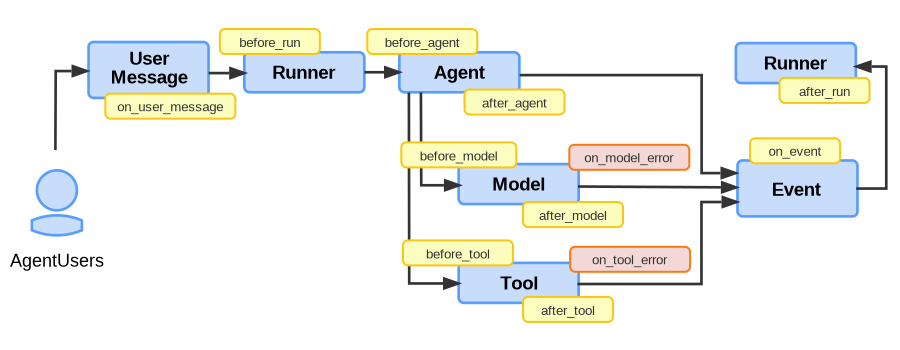 图 1. ADK代理工作流程图(包含插件回调钩子)
以下部分将更详细地介绍插件(Plugins)可使用的回调函数(callback hooks)。
- 用户消息回调函数(User Message callbacks)
- 运行器启动回调函数(Runner start callbacks)
- 代理执行回调(Agent execution callbacks)
- 模型回调函数(Model callbacks)
- 工具回调函数(Tool callbacks)
- 事件回调函数
- 运行端回调函数(Runner end callbacks)
用户消息回调函数(User Message callbacks)
一条用户消息 c`fallback`(回退机制)on_user_message_callback这种情况发生在用户发送消息时。 on_user_message_callback 这是第一个被执行的钩子(hook),它为你提供了检查或修改初始输入数据的机会。
- 运行时: 这个回调函数会在……之后立即执行。
runner.run()在任何其他处理之前,先进行这个操作。 - 用途: 这是第一次有机会检查或修改用户的原始输入数据。
- 流量控制(Flow Control): 返回一个
types.Content反对;不同意 replace 用户的原始消息。
以下代码示例展示了该回调函数的基本语法:
运行器启动回调函数(Runner start callbacks)
A 运行器启动 `callback`(回调函数)before_run_callback这种情况发生在……的时候。 Runner
该对象接收可能已被修改的用户消息,并为其执行做好准备。 before_run_callback 系统会在这里进行初始化设置(即“全局配置”),这样在任何代理程序的逻辑开始执行之前,所有必要的准备工作就已经完成。
- 运行时: 在……之后
on_user_message_callback当……的时候Runner在代理逻辑开始执行之前,会先进行相应的准备工作。 - 用途: 在调用相关功能之前,需要先进行全局配置或初始化操作。
- 流量控制(Flow Control): 返回一个
types.Content反对;不同意 停止执行theRunner程序会提前终止运行,并最终使用该内容作为结果。 在 Python 中,这种提前终止的行为会影响到所有的根代理(root agents),包括……(此处内容缺失)。LlmAgent或者一个Workflow返回None以便一切能够正常进行。
以下代码示例展示了该回调函数的基本语法:
代理执行回调(Agent execution callbacks)
代理执行(Agent execution) `callbacks`(回调函数)before_agent, after_agent)这种情况发生在……的时候。
Runner 该对象会调用一个代理(agent)。 before_agent_callback 该脚本会立即执行,且在代理开始其主要工作之前运行。代理的主要工作包括处理请求的整个流程,这可能涉及调用模型或工具。当代理完成所有步骤并准备好结果后,……
after_agent_callback 在 Python 中,如果代理的运行过程中抛出了异常(即发生了错误),
on_agent_error_callback(*, agent, callback_context, error) 应该运行(run)而不是……
after_agent_callback这个回调函数仅用于检测程序是否失败(即是否抛出了异常);它的返回值会被忽略,而原始的异常仍然会被抛出。
注意: 实现了这些回调函数的插件会被执行。 在……之前 在代理(Agent)级别,相应的回调函数会被执行。此外,如果某个插件(Plugin)级别的代理回调函数返回的值不是预期的结果(即返回的内容与预期不同),那么…… None 如果返回的是空字符串("")或 null 值,那么就会触发代理级(Agent-level)的回调函数。 未执行 (已跳过)。
有关作为 Agent 对象的一部分而定义的 Agent 回调的更多信息,请参阅…… 回调函数的类型.
模型回调函数(Model callbacks)
模型回调函数(Model callbacks) (before_model, after_model, on_model_error) 在 Model 对象执行之前或之后,或者当模型调用失败时,某些操作仍会继续执行。具体细节如下:
- 如果某个代理需要调用一个 AI 模型,
before_model_callback“首先运行”。 - 如果模型调用成功,
after_model_callback“Next run…”(下次运行……) - 如果模型调用失败并抛出异常,那么……
on_model_error_callback相反,系统会触发相应的恢复机制,从而实现平稳的恢复过程。
注意: 实现该功能的插件: before_model 和 after_model
回调方法会被执行。 在……之前 模型级别的回调函数已被执行。
此外,如果某个插件级别的模型回调函数返回的值不是预期的结果(即不是某个特定的值),那么……(此处原文内容不完整)。
None 如果返回的是空字符串("")或 null 值,那么模型级别的回调函数(Model-level callback)将会被执行。 未执行 (已跳过)。
关于错误回调详情的模型(Model on error callback details)
Model 对象的错误处理回调(on error callback)的工作原理如下:
- 运行时: 当在调用模型时抛出异常时。
- 常见使用场景: 优雅的错误处理机制:记录具体的错误信息,或返回一个替代响应(例如:“AI服务当前不可用”)。
- 流量控制(Flow Control):
- 返回一个
LlmResponse反对;不同意 抑制异常(即不让程序因异常而停止运行) 并提供一个备用(即“ fallback”)结果。 - 返回值
None(用于)允许原始异常被抛出。
- 返回一个
注意:如果 Model 对象的执行返回了某个结果(或值),那么…… LlmResponse系统会恢复执行流程。 after_model_callback 该功能会正常被触发。
以下代码示例展示了该回调函数的基本语法:
工具回调函数(Tool callbacks)
工具回调函数(Tool callbacks) (before_tool, after_tool, on_tool_error) 对于插件(Plugins):
它们的执行可以在某个工具的执行之前或之后进行;也可以在工具执行过程中发生错误时被触发。具体细节如下:
- 当代理执行某个工具(Tool)时,
before_tool_callback“首先运行”。 - 如果该工具成功执行了,
after_tool_callback“Next run…”(下次运行……) - 如果该工具抛出异常(exception),则……
on_tool_error_callback相反,系统会触发相应的处理机制,从而让你有机会处理这个故障。on_tool_error_callback返回一个字典(dict)。after_tool_callback该功能将会正常触发。
注意: 实现了这些回调函数的插件会被执行。 在……之前 工具级别的回调被执行了。此外,如果某个插件级别的工具回调返回的结果不是预期的内容(即返回了其他类型的值),那么…… None 如果返回的是空字符串("")或 null 值,那么工具级别的回调函数(Tool-level callback)将会被执行。 未执行 (已跳过)。
错误处理回调函数的详细信息
Tool 对象的错误处理回调(on error callback)的工作原理如下:
- 运行时: 当在工具执行过程中抛出异常时……
runmethod. - 用途: 捕获特定的工具异常(例如……)
APIError记录这次失败,并向大型语言模型(LLM)返回一条易于理解的错误信息。 - 流量控制(Flow Control): 返回一个
dict给……;发送到…… 抑制异常(即不让程序因异常而停止运行)提供一个备用结果(即当主方法失败时可以使用的替代结果)。None(用于)允许原始异常被抛出。
注意::通过返回一个值…… dict这会恢复执行流程。
after_tool_callback 该功能将正常触发。
以下代码示例展示了该回调函数的基本语法:
事件回调函数
An 事件回调函数 (on_event_callback当代理生成某些输出(例如文本响应或工具调用结果)时,它会将这些输出直接提供出来。 Event
objects. The on_event_callback 每次事件都会触发相应的处理流程(即“fire”操作),使您能够在数据被传输给客户端之前对其进行修改。
- 运行时: 在某个代理(agent)提供了所需的信息或结果之后……
Event但在数据被发送给用户之前,代理程序的运行可能会产生多个事件(即多个操作或结果)。 - 用途: 这些功能非常实用,可用于修改或丰富事件数据(例如添加元数据),或根据特定事件来触发相应的副作用(即额外的操作或响应)。
- 流量控制(Flow Control): 返回一个……
Event反对;不同意 `override` 在 Python 中,ADK 会将你的事件数据合并到原始事件数据中;只有你手动设置的字段才会被应用到合并后的结果中。id,invocation_id,以及timestamp这些数据总是来源于原始事件(original event)。
以下代码示例展示了该回调函数的基本语法:
运行端回调函数(Runner end callbacks)
The **Runner end** 回调函数(callback function) (after_run_callback) 当代理完成了整个流程,并且所有事件都已被处理后,就会发生这种情况。 Runner
程序完成了其运行过程。 after_run_callback 这是最后的处理步骤(即“final hook”),非常适合用于数据清理(cleanup)和生成最终报告(final reporting)。
- 运行时: 在……之后
Runner完全完成了请求的执行过程。 - 用途: 非常适合用于全球范围内的清理任务,例如关闭连接、或完成日志和指标数据的处理工作。
- 流量控制(Flow Control): 这个回调函数仅用于“拆解”(teardown)操作,无法更改最终结果。
以下代码示例展示了该回调函数的基本语法:
在 Python 中,ADK 会向您的插件通知另外两个生命周期事件:
on_run_error_callback(*, invocation_context, error):执行该操作,而不是执行其他操作。after_run_callback当运行过程中出现未处理的异常(即异常没有被正确捕获和处理)时,会触发这个回调函数。该回调函数仅用于检测运行是否失败;其返回值会被忽略,而原始的异常仍然会被抛出。close():每当您关闭某个插件时,该脚本会为该插件运行一次。Runner使用(with)await runner.close()请注意:上述内容似乎是关于某个软件插件(plugin)的配置或使用指南。其中包含了一些技术术语,例如 “API identifier” 和 “placeholder”,但这些术语在中文中并没有直接的对应表达。因此,以下翻译尽量保持了原文的逻辑性和技术性: “在每次运行过程中,该插件不应多次释放其所拥有的资源(例如 HTTP 客户端或指标导出器)。每次运行后,插件都应确保释放这些资源。”close()该调用(call)受到运行环境(runner’s environment)的限制/约束。plugin_close_timeout默认情况下,延迟时间为五秒。
在 Go 语言中,可以使用 `set` 数据结构来存储唯一的值(即每个值只能出现一次)。`set` 的创建方法如下:
```go
package main
import "fmt"
func main() {
// 创建一个空的 set
mySet := make(map[string]bool)
// 向 set 中添加元素
mySet["apple"] = "red"
mySet["banana"] = "yellow"
mySet["orange"] = "green"
// 遍历 set 中的元素并打印出来
for key, value := range mySet {
fmt.Printf("Key: %s, Value: %s\n", key, value)
}
}
```
输出结果:
```
Key: apple, Value: red
Key: banana, Value: yellow
Key: orange, Value: green
```
需要注意的是,`set` 是一个无序的(即元素之间的顺序是不确定的)且不支持查找特定元素的索引。如果你需要按照键的顺序遍历元素,或者需要支持查找特定元素,可以考虑使用 `map` 数据结构。 CloseFunc 在……里面;处于……状态 plugin.Config 为了释放插件所拥有的资源(例如需要在进行进程退出前先清空的缓冲输出器),插件会执行相应的操作。 Runner “Doesn’t call it for you”: 你应该主动调用该插件(即自己执行相应的操作,而不是等待插件来触发某些功能)。 Close 当您的应用程序关闭时,应该执行某些特定的操作(即:应该调用某个方法)。不过,ADK Go 并不会强制要求开发者必须实现这些操作。
runner.PluginConfig.CloseTimeout因此,任何需要较长时间才能完成的清理工作都被“绑定”(即被安排在特定的时间点或流程中)来完成。
CloseFunc itself.
p, err := plugin.New(plugin.Config{
    Name: "my_plugin",
    CloseFunc: func() error {
        // Flush buffers and release clients here.
        return nil
    },
})
if err != nil {
    log.Fatal(err)
}
defer p.Close()
下一步骤
请查看这些资源,以帮助您开发和将插件应用于您的 ADK 项目:
- 有关更多 ADK 插件代码示例,请参阅…… ADK Samples 代码库.
- 有关为安全目的申请使用插件(Plugins)的信息,请参阅…… 用于安全防护机制的回调函数(Callbacks)和插件(Plugins).