用于 ADK 的未来型 AGI(人工智能)可观测性技术
在 ADK 中得到支持。Python
未来的通用人工智能(AGI) 这是一个用于观察和评估 AI 代理(AI agents)性能的平台。
traceai-google-adk 该软件包会自动将 ADK 代理的所有运行记录、模型调用结果、工具执行过程以及事件循环周期的数据,以 OpenTelemetry 的形式传输到 Future AGI 系统中。通过这些数据,你可以查看程序的执行流程、分析程序的行为,并进行各种实验。
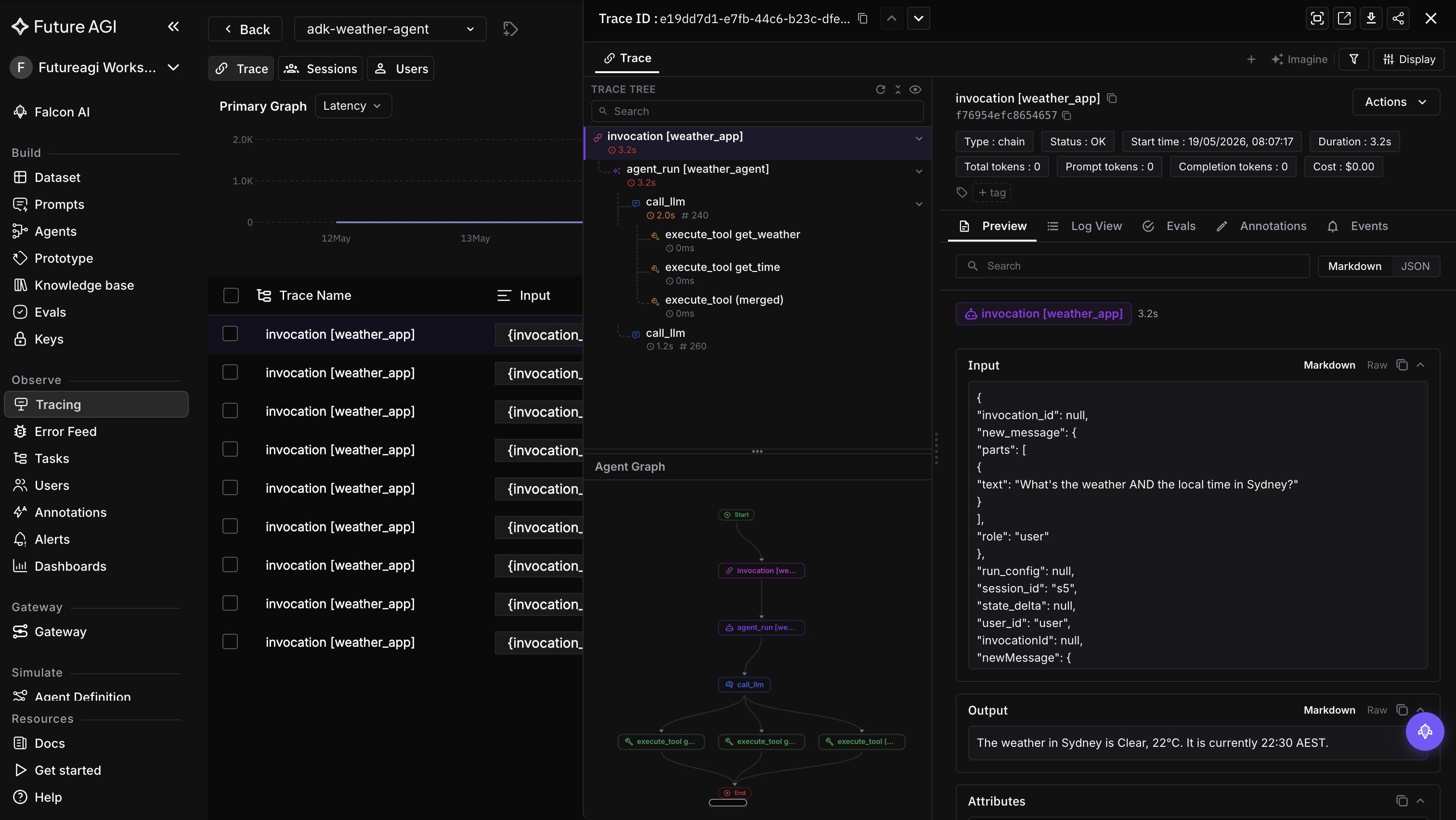
概述
The traceai-google-adk 该软件包为 ADK 添加了 OpenTelemetry 监控功能,使您能够:
- 跟踪代理正在运行: 记录所有代理调用、工具使用、模型请求及响应的相关信息,包括用户输入的提示内容、自动完成的输入内容、所使用的参数以及令牌(token)的使用情况。
- “评估行为”(Evaluate behavior): 使用预先构建的或自定义的评估工具来分析捕获到的日志数据(即“trace”)。
- 调试代理(Debug agents): 深入分析层次化的运行树(run trees),以查找那些执行失败的工具调用(tool calls)、导致延迟增加的“热点”(latency hotspots),以及那些出现异常行为的程序分支(unexpected branches)。
先决条件
- 在 [此处填写网站地址] 注册账号。 app.futureagi.com.
- 请复制您的……(请根据实际情况填写具体的内容)。
FI_API_KEY和FI_SECRET_KEY从仪表板中获取数据。 - 设置环境变量:
export FI_API_KEY=<your-fi-api-key>
export FI_SECRET_KEY=<your-fi-secret-key>
export GOOGLE_API_KEY=<your-google-api-key>
安装
The traceai-google-adk `package declares` google-adk 和 google-genai 作为运行时依赖项,它们会被间接地安装(即:当某个程序被安装时,其所需的运行时依赖项也会被一并安装)。
将追踪数据发送到未来的通用人工智能(AGI)系统
在程序启动时,只需注册一次 Future AGI Tracer,然后将其关联到相应的系统中即可。
GoogleADKInstrumentor 在……之前 正在运行任何代理程序;此后所有对 ADK 代理的调用都会被自动记录下来。
import asyncio

from fi_instrumentation import register
from fi_instrumentation.fi_types import ProjectType
from google.adk.agents import Agent
from google.adk.runners import InMemoryRunner
from google.genai import types
from traceai_google_adk import GoogleADKInstrumentor

tracer_provider = register(
    project_type=ProjectType.OBSERVE,
    project_name="adk-weather-agent",
)
GoogleADKInstrumentor().instrument(tracer_provider=tracer_provider)


def get_weather(city: str) -> dict:
    """Retrieves the current weather report for a specified city."""
    if city.lower() == "new york":
        return {
            "status": "success",
            "report": "The weather in New York is sunny with a temperature of 25°C.",
        }
    return {
        "status": "error",
        "error_message": f"Weather information for '{city}' is not available.",
    }


agent = Agent(
    name="weather_agent",
    model="gemini-flash-latest",
    description="Agent to answer weather questions.",
    instruction="You must use the available tools to find an answer.",
    tools=[get_weather],
)


async def main():
    runner = InMemoryRunner(agent=agent, app_name="weather_app")
    await runner.session_service.create_session(
        app_name="weather_app", user_id="user", session_id="session"
    )
    async for event in runner.run_async(
        user_id="user",
        session_id="session",
        new_message=types.Content(
            role="user",
            parts=[types.Part(text="What is the weather in New York?")],
        ),
    ):
        if event.is_final_response() and event.content and event.content.parts:
            print(event.content.parts[0].text.strip())


if __name__ == "__main__":
    asyncio.run(main())
在仪表板中查看跟踪记录(View Traces in the Dashboard)
运行代理程序,然后在相应的软件或环境中打开你的项目。 Future AGI 仪表板每个 ADK 代理的运行都会生成一条层次化的跟踪记录(trace),其中包含了用户输入的提示(prompts)、用户的选择结果(completions)、模型参数(model parameters)、令牌的使用情况(token usage)、工具的输入与输出(tool inputs and outputs),以及事件循环的运行情况(event-loop cycles),所有这些内容都可供进一步检查和分析。